This time we’re going bigger than ever. Fabric, Power BI, SQL, AI and more. We're covering it all. You won't want to miss it.
Learn moreLevel up your Power BI skills this month - build one visual each week and tell better stories with data! Get started
Hello there! I hope you guys can help me.
I have a problem with the total sum under my matrix in pbi.
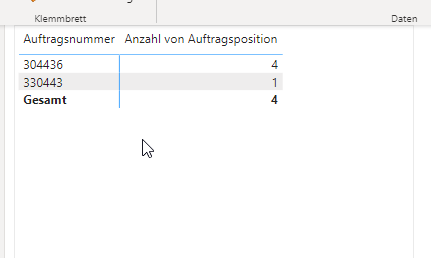
I got 2 different ordernumbers. Order 1 has 4 order items; Order 2 has 1 item.
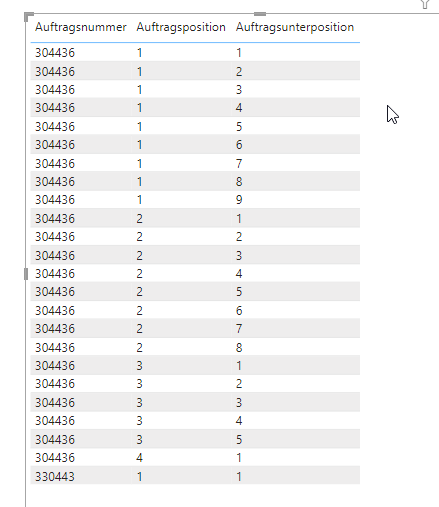
In Order 1, I get 23 subitems. thats why my warehouse software is duplicating the order items. (see below)
I want to know how many Items are in each order. Im using distinct count.
The count is correkt, but the total is wrong. (see below)
I have searched a lot now, but didnt find something useful.
Pls help 🙂
thx.
Solved! Go to Solution.
Hi @domden,
To achieve this, you can use one measure that uses a variable to summarize the data. Help on variables here: https://docs.microsoft.com/en-us/dax/best-practices/dax-variables
Measure = VAR _Tbl = SUMMARIZE('TableName',[OrderNumber],"Count",DISTINCTCOUNT([OrderItem]))
RETURN
sumx(_Tbl,[Count])
The variable is doing the distinct count per category in a table and then the sumx is referencing the variable table to sum the distinct counts together. Hope this helps!
Hi @domden,
To achieve this, you can use one measure that uses a variable to summarize the data. Help on variables here: https://docs.microsoft.com/en-us/dax/best-practices/dax-variables
Measure = VAR _Tbl = SUMMARIZE('TableName',[OrderNumber],"Count",DISTINCTCOUNT([OrderItem]))
RETURN
sumx(_Tbl,[Count])
The variable is doing the distinct count per category in a table and then the sumx is referencing the variable table to sum the distinct counts together. Hope this helps!
Check out the April 2026 Power BI update to learn about new features.
Sign up to receive a private message when registration opens and key events begin.
If you have recently started exploring Fabric, we'd love to hear how it's going. Your feedback can help with product improvements.