Learn from the best! Meet the four finalists headed to the FINALS of the Power BI Dataviz World Championships! Register now
Hello there! I hope you guys can help me.
I have a problem with the total sum under my matrix in pbi.
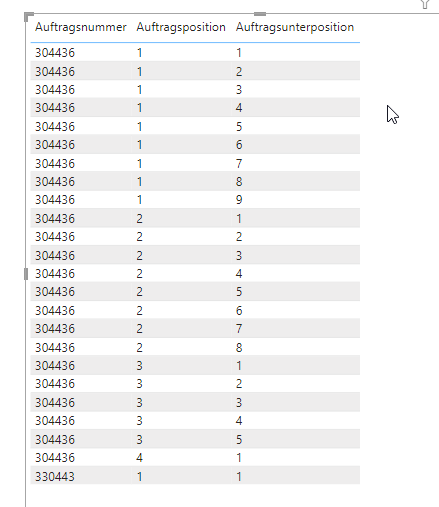
I got 2 different ordernumbers. Order 1 has 4 order items; Order 2 has 1 item.
In Order 1, I get 23 subitems. thats why my warehouse software is duplicating the order items. (see below)
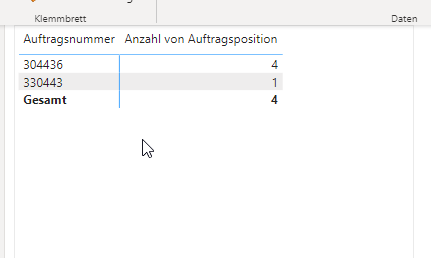
I want to know how many Items are in each order. Im using distinct count.
The count is correkt, but the total is wrong. (see below)
I have searched a lot now, but didnt find something useful.
Pls help 🙂
thx.
Solved! Go to Solution.
Hi @domden,
To achieve this, you can use one measure that uses a variable to summarize the data. Help on variables here: https://docs.microsoft.com/en-us/dax/best-practices/dax-variables
Measure = VAR _Tbl = SUMMARIZE('TableName',[OrderNumber],"Count",DISTINCTCOUNT([OrderItem]))
RETURN
sumx(_Tbl,[Count])
The variable is doing the distinct count per category in a table and then the sumx is referencing the variable table to sum the distinct counts together. Hope this helps!
Hi @domden,
To achieve this, you can use one measure that uses a variable to summarize the data. Help on variables here: https://docs.microsoft.com/en-us/dax/best-practices/dax-variables
Measure = VAR _Tbl = SUMMARIZE('TableName',[OrderNumber],"Count",DISTINCTCOUNT([OrderItem]))
RETURN
sumx(_Tbl,[Count])
The variable is doing the distinct count per category in a table and then the sumx is referencing the variable table to sum the distinct counts together. Hope this helps!
| User | Count |
|---|---|
| 15 | |
| 6 | |
| 6 | |
| 6 | |
| 5 |