Don't miss your chance to take the Fabric Data Engineer (DP-700) exam on us!
Learn moreWe've captured the moments from FabCon & SQLCon that everyone is talking about, and we are bringing them to the community, live and on-demand. Starts on April 14th. Register now
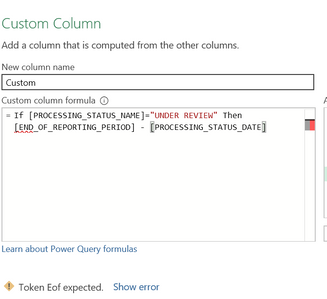
I keep getting Token EOF error messages, even when I try a much simpler formula. What is the problem I'm creating for myself?
Solved! Go to Solution.
DAX uses a different syntax. IF(<condition>,<do if true>,<do if false>)
Note: In Power Query commands are case sensitive. There use if ... then ... else
DAX uses a different syntax. IF(<condition>,<do if true>,<do if false>)
Note: In Power Query commands are case sensitive. There use if ... then ... else
OK, thanks. Now I see the mistake I was making, i completely missed that I needed an "else" there to close it out.
In DAX you can get away with not specifying the "else" part - it will return BLANK() for you. In Power Query "else" is mandatory.
If you have recently started exploring Fabric, we'd love to hear how it's going. Your feedback can help with product improvements.
A new Power BI DataViz World Championship is coming this June! Don't miss out on submitting your entry.
Share feedback directly with Fabric product managers, participate in targeted research studies and influence the Fabric roadmap.
| User | Count |
|---|---|
| 5 | |
| 3 | |
| 3 | |
| 2 | |
| 2 |
| User | Count |
|---|---|
| 9 | |
| 8 | |
| 7 | |
| 5 | |
| 5 |