Share feedback directly with Fabric product managers, participate in targeted research studies and influence the Fabric roadmap.
Sign up nowGet Fabric certified for FREE! Don't miss your chance! Learn more
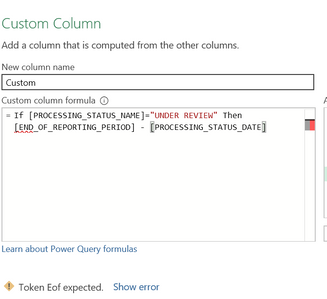
I keep getting Token EOF error messages, even when I try a much simpler formula. What is the problem I'm creating for myself?
Solved! Go to Solution.
DAX uses a different syntax. IF(<condition>,<do if true>,<do if false>)
Note: In Power Query commands are case sensitive. There use if ... then ... else
DAX uses a different syntax. IF(<condition>,<do if true>,<do if false>)
Note: In Power Query commands are case sensitive. There use if ... then ... else
OK, thanks. Now I see the mistake I was making, i completely missed that I needed an "else" there to close it out.
In DAX you can get away with not specifying the "else" part - it will return BLANK() for you. In Power Query "else" is mandatory.
If you love stickers, then you will definitely want to check out our Community Sticker Challenge!
Check out the January 2026 Power BI update to learn about new features.
| User | Count |
|---|---|
| 7 | |
| 4 | |
| 4 | |
| 4 | |
| 3 |
| User | Count |
|---|---|
| 13 | |
| 11 | |
| 11 | |
| 7 | |
| 6 |