Don't miss your chance to take the Fabric Data Engineer (DP-600) exam for FREE! Find out how by watching the DP-600 session on-demand now through April 28th.
Learn moreJoin the FabCon + SQLCon recap series. Up next: Power BI, Real-Time Intelligence, IQ and AI, and Data Factory take center stage. All sessions are available on-demand after the live show. Register now
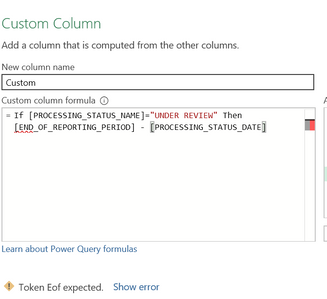
I keep getting Token EOF error messages, even when I try a much simpler formula. What is the problem I'm creating for myself?
Solved! Go to Solution.
DAX uses a different syntax. IF(<condition>,<do if true>,<do if false>)
Note: In Power Query commands are case sensitive. There use if ... then ... else
DAX uses a different syntax. IF(<condition>,<do if true>,<do if false>)
Note: In Power Query commands are case sensitive. There use if ... then ... else
OK, thanks. Now I see the mistake I was making, i completely missed that I needed an "else" there to close it out.
In DAX you can get away with not specifying the "else" part - it will return BLANK() for you. In Power Query "else" is mandatory.
Check out the April 2026 Power BI update to learn about new features.
If you have recently started exploring Fabric, we'd love to hear how it's going. Your feedback can help with product improvements.
A new Power BI DataViz World Championship is coming this June! Don't miss out on submitting your entry.
| User | Count |
|---|---|
| 8 | |
| 6 | |
| 5 | |
| 5 | |
| 4 |