Don't miss your chance to take the Fabric Data Engineer (DP-700) exam on us!
Learn moreThe FabCon + SQLCon recap series starts April 14th at 8am Pacific. If you’re tracking where AI is going inside Fabric, this first session is a can't miss. Register now
Dear all,
I am new to M code. I am trying to create a column A based on data in Column B. Column A objective is to get column B data if Column B contains text. For e.g. if column B contains BNP, then, Column A should have full text of cells containing BNP in column B.
can anybody help me.
Solved! Go to Solution.
Hello @robinshalabh
the problem I see with the solution from @Payeras_BI is if you have a column that is formated as text not as any. This would mean, everey value is text and so you will get not the desired result. When you use this formula, it should always work
let
Check = try Number.From([ColumnB])
in
if Check[HasError] = true then [ColumnB] else null
Here the complete code example
let
Source = Table.FromRows(Json.Document(Binary.Decompress(Binary.FromText("i45WcvILUIrViVYyNDIG045gEi4KJk3BpJlSbCwA", BinaryEncoding.Base64), Compression.Deflate)), let _t = ((type nullable text) meta [Serialized.Text = true]) in type table [ColumnB = _t]),
#"Changed Type" = Table.TransformColumnTypes(Source,{{"ColumnB", type text}}),
#"Added Custom" = Table.AddColumn(#"Changed Type", "ColumnA", each let
Check = try Number.From([ColumnB])
in
if Check[HasError] = true then [ColumnB] else null)
in
#"Added Custom"
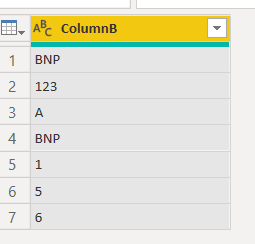
transform this
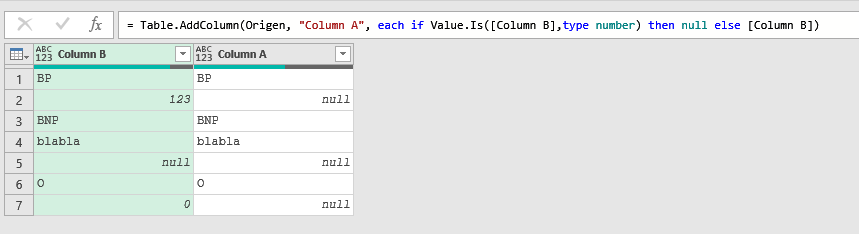
into this
Hello @robinshalabh
the problem I see with the solution from @Payeras_BI is if you have a column that is formated as text not as any. This would mean, everey value is text and so you will get not the desired result. When you use this formula, it should always work
let
Check = try Number.From([ColumnB])
in
if Check[HasError] = true then [ColumnB] else null
Here the complete code example
let
Source = Table.FromRows(Json.Document(Binary.Decompress(Binary.FromText("i45WcvILUIrViVYyNDIG045gEi4KJk3BpJlSbCwA", BinaryEncoding.Base64), Compression.Deflate)), let _t = ((type nullable text) meta [Serialized.Text = true]) in type table [ColumnB = _t]),
#"Changed Type" = Table.TransformColumnTypes(Source,{{"ColumnB", type text}}),
#"Added Custom" = Table.AddColumn(#"Changed Type", "ColumnA", each let
Check = try Number.From([ColumnB])
in
if Check[HasError] = true then [ColumnB] else null)
in
#"Added Custom"
transform this
into this
Hi @robinshalabh ,
Add a Custom Column and type in the following code:
if Value.Is([Column B],type number) then null else [Column B])
If you have recently started exploring Fabric, we'd love to hear how it's going. Your feedback can help with product improvements.
A new Power BI DataViz World Championship is coming this June! Don't miss out on submitting your entry.
Share feedback directly with Fabric product managers, participate in targeted research studies and influence the Fabric roadmap.
| User | Count |
|---|---|
| 5 | |
| 4 | |
| 3 | |
| 2 | |
| 2 |
| User | Count |
|---|---|
| 8 | |
| 6 | |
| 6 | |
| 6 | |
| 5 |