cancel
Showing results for 
Search instead for 
Did you mean: 

July 7 - July 17 | Round 2 of the Power BI Dataviz World Championships. Don't miss your chance! Learn more

Reply

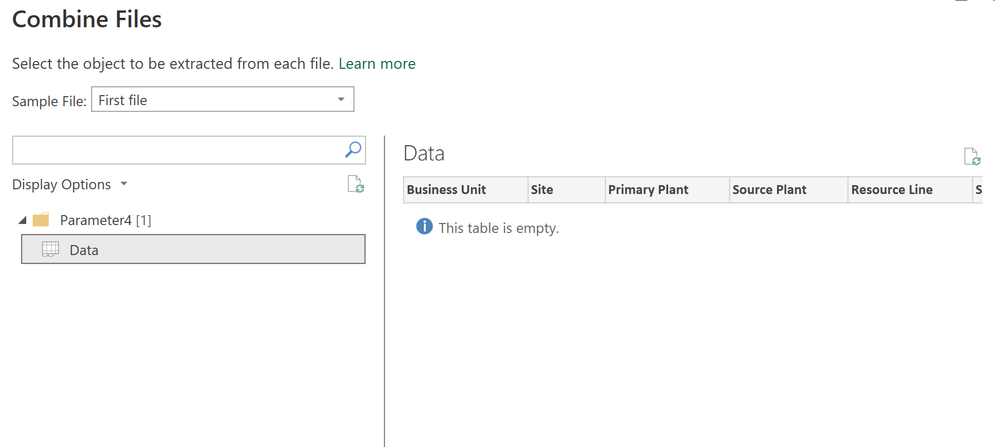
Table is empty message

Hi


I'm bringing in an excel file (which definitely has many rows of data!) but when I try to bring it into powerquery I see the below.  No rows of data visible, ony the headers.


dapperscavenger_0-1699973992941.png


The report works for other files I bring in, just not this one.  Any thoughts?


1 ACCEPTED SOLUTION
AnalyticPulse
Solution Sage
Solution Sage

maybe that excel is corrupted or incompatible, can you check the version or click on refresh button above. try to save another copy of excel, save it by another name and then import. check the file format.

View solution in original post

3 REPLIES 3
AnalyticPulse
Solution Sage
Solution Sage

maybe that excel is corrupted or incompatible, can you check the version or click on refresh button above. try to save another copy of excel, save it by another name and then import. check the file format.

Yes, okay, not sure exactly what the issue was, as the excel seemed to work fine.  But I threw it into a blank workbook, saved with same filenmame, and now the powerquery picks it up no issues.

Anonymous
Not applicable

Can you make the data on the worksheet a proper table, and then try again?


--Nate

Helpful resources

Announcements
FabCon and SQLCon Barcelona 2026

FabCon & SQLCon – Barcelona 2026

Join us in Barcelona for FabCon and SQLCon, the Fabric, Power BI, SQL, and AI community event. Save €200 with code FABCMTY200.

60 days of Data Days Carousel

Data Days 2026

Join Fabric Data Days 2026: 60 days of free live/on-demand sessions, challenges, study groups, and certification opportunities.

Power BI DataViz World Championships carousel

Power BI DataViz World Championships - June 2026

A new Power BI DataViz World Championship is coming this June! Don't miss out on submitting your entry.