Don't miss your chance to take the Fabric Data Engineer (DP-600) exam for FREE! Find out how by watching the DP-600 session on-demand now through April 28th.
Learn moreJoin the FabCon + SQLCon recap series. Up next: Power BI, Real-Time Intelligence, IQ and AI, and Data Factory take center stage. All sessions are available on-demand after the live show. Register now
Hi
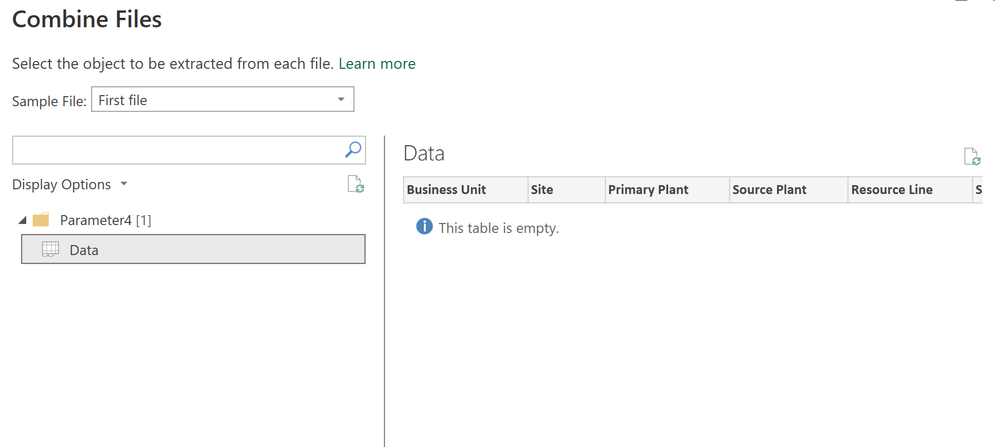
I'm bringing in an excel file (which definitely has many rows of data!) but when I try to bring it into powerquery I see the below. No rows of data visible, ony the headers.
The report works for other files I bring in, just not this one. Any thoughts?
Solved! Go to Solution.
maybe that excel is corrupted or incompatible, can you check the version or click on refresh button above. try to save another copy of excel, save it by another name and then import. check the file format.
Yes, okay, not sure exactly what the issue was, as the excel seemed to work fine. But I threw it into a blank workbook, saved with same filenmame, and now the powerquery picks it up no issues.
Can you make the data on the worksheet a proper table, and then try again?
--Nate
Check out the April 2026 Power BI update to learn about new features.
If you have recently started exploring Fabric, we'd love to hear how it's going. Your feedback can help with product improvements.
A new Power BI DataViz World Championship is coming this June! Don't miss out on submitting your entry.
| User | Count |
|---|---|
| 5 | |
| 3 | |
| 3 | |
| 3 | |
| 3 |
| User | Count |
|---|---|
| 8 | |
| 6 | |
| 5 | |
| 5 | |
| 4 |