This is best Fabric, Power BI, SQL and AI community event. How do we know? The last event sold out! Save €200 with code FABCMTY200.
Register nowA new Data Days event is coming soon! This time we’re going bigger than ever. Fabric, Power BI, SQL, AI and more. Don't miss out.
Hi,
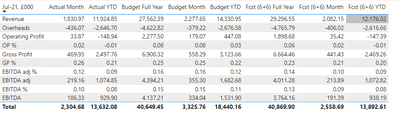
I have taken this table from Excel & cannot use 'transpose' as this is the layout required - How do I edit this query so that the '%' rows are in percentage format & the Jul-21 list is in this order:
Revenue, Gross Profit, GP%, Overheads, Operating Profit, OP%, EBITDA, EBITDA %, EBITDA adj, EBITDA adj %?
Thanks
Solved! Go to Solution.
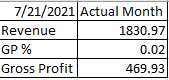
Here's a solution:
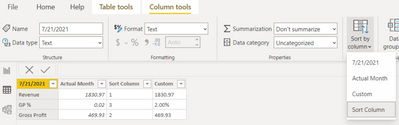
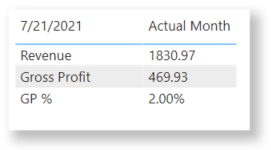
Here's the end result. It works, but all the values are of the text data type. But maybe that doesn't matter here because we wouldn't want to sum decimal numbers with percentages anyway.
I hope this helps. If it does, please mark it as the solution.
@Anonymous
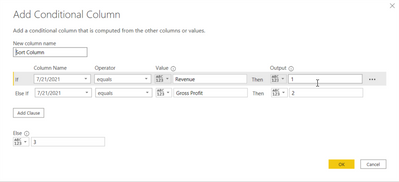
1. To sort the column, you can add an index then sort using conditional column as @Anonymous suggested.
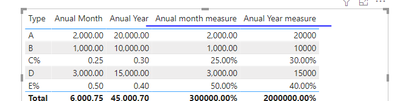
2. In order to change some value to %, you need to create a measure for each column, just replace the referred column to the corresponding column name. For example:
Anual month measure = IF(RIGHT(MAX([Type]),1)="%",FORMAT(MAX([Anual Month]),"Percent"),MAX([Anual Month]))
Anual Year measure = IF(RIGHT(MAX([Type]),1)="%",FORMAT(MAX([Anual Year]),"Percent"),MAX([Anual Year]))
Paul Zheng _ Community Support Team
If this post helps, please Accept it as the solution to help the other members find it more quickly.
@Anonymous @Anonymous Thats perfect, thank you very much for your help!
@Anonymous I don't suppose you know what to add to the measure so that the percentage rows show to the nearest percent (0 d.p.)? Formatting to 0 d.p. in 'Measure tools' only applies to the non-percentage values. Thanks
@Anonymous
1. To sort the column, you can add an index then sort using conditional column as @Anonymous suggested.
2. In order to change some value to %, you need to create a measure for each column, just replace the referred column to the corresponding column name. For example:
Anual month measure = IF(RIGHT(MAX([Type]),1)="%",FORMAT(MAX([Anual Month]),"Percent"),MAX([Anual Month]))
Anual Year measure = IF(RIGHT(MAX([Type]),1)="%",FORMAT(MAX([Anual Year]),"Percent"),MAX([Anual Year]))
Paul Zheng _ Community Support Team
If this post helps, please Accept it as the solution to help the other members find it more quickly.
@Anonymous I like this. It preserves the data type and only relies on a % suffix. 👍
Here's a solution:
Here's the end result. It works, but all the values are of the text data type. But maybe that doesn't matter here because we wouldn't want to sum decimal numbers with percentages anyway.
I hope this helps. If it does, please mark it as the solution.
Check out the May 2026 Power BI update to learn about new features.
Sign up to receive a private message when registration opens and key events begin.
If you have recently started exploring Fabric, we'd love to hear how it's going. Your feedback can help with product improvements.
| User | Count |
|---|---|
| 4 | |
| 3 | |
| 2 | |
| 2 | |
| 1 |