Don't miss your chance to take the Fabric Data Engineer (DP-600) exam for FREE! Find out how by attending the DP-600 session on April 23rd (pacific time), live or on-demand.
Learn moreNext up in the FabCon + SQLCon recap series: The roadmap for Microsoft SQL and Maximizing Developer experiences in Fabric. All sessions are available on-demand after the live show. Register now
Hello
I´m trying to creat a table based in annother table using Table.FirstN conditional.
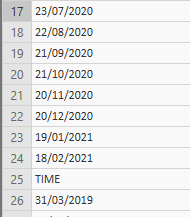
But I don´t know how to write a conditional that helps me to only select the data that are numbers in the colum,
until the first text type data appears like this:
Solved! Go to Solution.
Hi @OscarSuarez10,
then:
#"Keep only data until the word TIME appears in the column" = Table.FirstN(#"Previous Step", each [yourColumnName] <> "TIME")
Hi @OscarSuarez10,
you can use the function Number.FromText and try/otherwise.
I've prepared some test data in Source and then the second step contains the solution you've asked for.
let
Source = Table.FromRows(Json.Document(Binary.Decompress(Binary.FromText("i45WMlSK1YlWMgKTxmAyEUwmgUkTMGkKJs2UYmMB", BinaryEncoding.Base64), Compression.Deflate)), let _t = ((type text) meta [Serialized.Text = true]) in type table [Column1 = _t]),
TakeFirstNumbers = Table.FirstN(
Source,
each
try
if Number.FromText([Column1]) <> Number.NaN then true else false
otherwise false
)
in
TakeFirstNumbers
Thank You for answer my question,
The thing is that I have to erase all the rows since the word "TIME" appears in the column
That´s why I´m tryin to use this:
#"Keep only data until the word TIME appears in the column" = Table.FirstN(#"Column", 24)
But I don´t want to use number 24 as a condition because If I use a different file, the word "TIME" can appear in a differente Row and It´s going to create a wrong table
Hi @OscarSuarez10,
then:
#"Keep only data until the word TIME appears in the column" = Table.FirstN(#"Previous Step", each [yourColumnName] <> "TIME")
Thank You that solved all my problems!
If you have recently started exploring Fabric, we'd love to hear how it's going. Your feedback can help with product improvements.
A new Power BI DataViz World Championship is coming this June! Don't miss out on submitting your entry.
| User | Count |
|---|---|
| 5 | |
| 3 | |
| 3 | |
| 3 | |
| 2 |
| User | Count |
|---|---|
| 7 | |
| 5 | |
| 5 | |
| 5 | |
| 4 |