cancel
Showing results for 
Search instead for 
Did you mean: 

We've captured the moments from FabCon & SQLCon that everyone is talking about, and we are bringing them to the community, live and on-demand. Starts on April 14th. Register now

Reply
OscarSuarez10
Helper III
Helper III

Table.FirstN Only select number values

Hello 

I´m trying to creat a table based in annother table using Table.FirstN conditional.


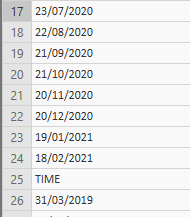
But I don´t know how to write a conditional that helps me to only select the data that are numbers in the colum, 

until the first text type data appears like this:


tabla.PNG


1 ACCEPTED SOLUTION

Hi @OscarSuarez10,

then:

#"Keep only data until the word TIME appears in the column" = Table.FirstN(#"Previous Step", each [yourColumnName] <> "TIME")

View solution in original post

4 REPLIES 4
Nolock
Resident Rockstar
Resident Rockstar

Hi @OscarSuarez10,

you can use the function Number.FromText and try/otherwise.

I've prepared some test data in Source and then the second step contains the solution you've asked for.

let
    Source = Table.FromRows(Json.Document(Binary.Decompress(Binary.FromText("i45WMlSK1YlWMgKTxmAyEUwmgUkTMGkKJs2UYmMB", BinaryEncoding.Base64), Compression.Deflate)), let _t = ((type text) meta [Serialized.Text = true]) in type table [Column1 = _t]),
    TakeFirstNumbers = Table.FirstN(
        Source, 
        each 
            try 
                if Number.FromText([Column1]) <> Number.NaN then true else false 
            otherwise false
    )
in
    TakeFirstNumbers

Thank You for answer my question,

The thing is that I have to erase all the rows since the word "TIME" appears in the column


That´s why I´m tryin to use this:

#"Keep only data until the word TIME appears in the column" = Table.FirstN(#"Column", 24)


But I don´t want to use number 24 as a condition because If I use a different file, the word "TIME" can appear in a differente Row and It´s going to create a wrong table


Hi @OscarSuarez10,

then:

#"Keep only data until the word TIME appears in the column" = Table.FirstN(#"Previous Step", each [yourColumnName] <> "TIME")

Thank You that solved all my problems!

Helpful resources

Announcements
New to Fabric survey Carousel

New to Fabric Survey

If you have recently started exploring Fabric, we'd love to hear how it's going. Your feedback can help with product improvements.

Power BI DataViz World Championships carousel

Power BI DataViz World Championships - June 2026

A new Power BI DataViz World Championship is coming this June! Don't miss out on submitting your entry.

Join our Fabric User Panel

Join our Fabric User Panel

Share feedback directly with Fabric product managers, participate in targeted research studies and influence the Fabric roadmap.

March Power BI Update Carousel

Power BI Community Update - March 2026

Check out the March 2026 Power BI update to learn about new features.