Get certified for free when you join Fabric Data Days 2026 and dive into Fabric, Power BI, SQL, AI, and other essential data skills.
Join nowTry your skills in the Power BI Dataviz World Championship! Round one ends June 26. Join now
Good morning, I created these formulas with conditionals to meet the needs, they work perfectly in the local PowerBI
but when trying to use this code in APP.POWERBI to introduce in the data flow it is giving several syntax errors that I could not solve.
Coligada do aluno ajust 2022 = var anterior = if('Consulta BD'[Vencimento real]<=year(2021),1,0)
return
if(anterior=0&&'Consulta BD'[Coligada do aluno]="34"&&'Consulta BD'[Filial do aluno]="1", "999",'Consulta BD'[Coligada do aluno])
inadimplente = if(AND('Consulta BD'[Data de vencimento]<today(),'Consulta BD'[Data de baixa]=blank()),1,0)Solved! Go to Solution.
Hi @marcelfirk
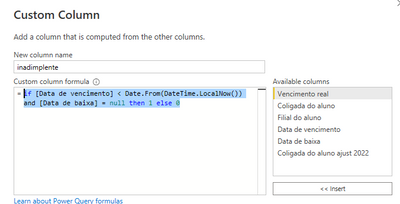
Are you going to add two columns to a table in a Power BI dataflow? If so, this can be done with M code.
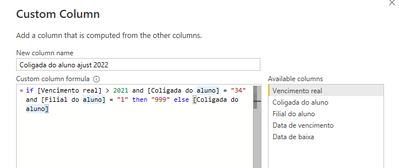
You can add two custom columns with below code
if [Vencimento real] > 2021 and [Coligada do aluno] = "34" and [Filial do aluno] = "1" then "999" else [Coligada do aluno]if [Vencimento real] > 2021 and [Coligada do aluno] = "34" and [Filial do aluno] = "1" then "999" else [Coligada do aluno]
Best Regards,
Community Support Team _ Jing
If this post helps, please Accept it as Solution to help other members find it.
Hi @marcelfirk
Are you going to add two columns to a table in a Power BI dataflow? If so, this can be done with M code.
You can add two custom columns with below code
if [Vencimento real] > 2021 and [Coligada do aluno] = "34" and [Filial do aluno] = "1" then "999" else [Coligada do aluno]if [Vencimento real] > 2021 and [Coligada do aluno] = "34" and [Filial do aluno] = "1" then "999" else [Coligada do aluno]
Best Regards,
Community Support Team _ Jing
If this post helps, please Accept it as Solution to help other members find it.
Hi @marcelfirk
You talk about Dataflows, which uses M like Power Query, but the code you show is DAX
Can you clarify?
|
|
Please accept the solution when done and consider giving a thumbs up if posts are helpful. Contact me privately for support with any larger-scale BI needs, tutoring, etc. |
Don't miss out on Data Days, June 15 through August 7. Learn Fabric, Power BI, SQL, AI and more.
Check out the May 2026 Power BI update to learn about new features.
| User | Count |
|---|---|
| 4 | |
| 4 | |
| 2 | |
| 2 | |
| 1 |