This is best Fabric, Power BI, SQL and AI community event. How do we know? The last event sold out! Save €200 with code FABCMTY200.
Register nowThe Fabric community is upgrading! Read all of the details including the timeline and what you can expect. Learn more
Good morning, I created these formulas with conditionals to meet the needs, they work perfectly in the local PowerBI
but when trying to use this code in APP.POWERBI to introduce in the data flow it is giving several syntax errors that I could not solve.
Coligada do aluno ajust 2022 = var anterior = if('Consulta BD'[Vencimento real]<=year(2021),1,0)
return
if(anterior=0&&'Consulta BD'[Coligada do aluno]="34"&&'Consulta BD'[Filial do aluno]="1", "999",'Consulta BD'[Coligada do aluno])
inadimplente = if(AND('Consulta BD'[Data de vencimento]<today(),'Consulta BD'[Data de baixa]=blank()),1,0)Solved! Go to Solution.
Hi @marcelfirk
Are you going to add two columns to a table in a Power BI dataflow? If so, this can be done with M code.
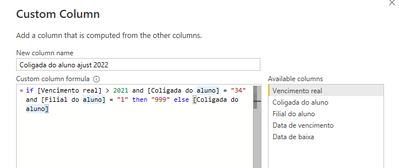
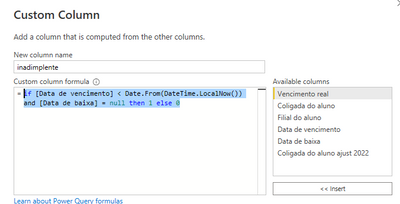
You can add two custom columns with below code
if [Vencimento real] > 2021 and [Coligada do aluno] = "34" and [Filial do aluno] = "1" then "999" else [Coligada do aluno]if [Vencimento real] > 2021 and [Coligada do aluno] = "34" and [Filial do aluno] = "1" then "999" else [Coligada do aluno]
Best Regards,
Community Support Team _ Jing
If this post helps, please Accept it as Solution to help other members find it.
Hi @marcelfirk
Are you going to add two columns to a table in a Power BI dataflow? If so, this can be done with M code.
You can add two custom columns with below code
if [Vencimento real] > 2021 and [Coligada do aluno] = "34" and [Filial do aluno] = "1" then "999" else [Coligada do aluno]if [Vencimento real] > 2021 and [Coligada do aluno] = "34" and [Filial do aluno] = "1" then "999" else [Coligada do aluno]
Best Regards,
Community Support Team _ Jing
If this post helps, please Accept it as Solution to help other members find it.
Hi @marcelfirk
You talk about Dataflows, which uses M like Power Query, but the code you show is DAX
Can you clarify?
|
|
Please accept the solution when done and consider giving a thumbs up if posts are helpful. Contact me privately for support with any larger-scale BI needs, tutoring, etc. |
Join us in Barcelona for FabCon and SQLCon, the Fabric, Power BI, SQL, and AI community event. Save €200 with code FABCMTY200.