FabCon is coming to Atlanta
Join us at FabCon Atlanta from March 16 - 20, 2026, for the ultimate Fabric, Power BI, AI and SQL community-led event. Save $200 with code FABCOMM.
Register now!- Power BI forums
- Get Help with Power BI
- Desktop
- Service
- Report Server
- Power Query
- Mobile Apps
- Developer
- DAX Commands and Tips
- Custom Visuals Development Discussion
- Health and Life Sciences
- Power BI Spanish forums
- Translated Spanish Desktop
- Training and Consulting
- Instructor Led Training
- Dashboard in a Day for Women, by Women
- Galleries
- Data Stories Gallery
- Themes Gallery
- Contests Gallery
- QuickViz Gallery
- Quick Measures Gallery
- Visual Calculations Gallery
- Notebook Gallery
- Translytical Task Flow Gallery
- TMDL Gallery
- R Script Showcase
- Webinars and Video Gallery
- Ideas
- Custom Visuals Ideas (read-only)
- Issues
- Issues
- Events
- Upcoming Events
Get Fabric Certified for FREE during Fabric Data Days. Don't miss your chance! Request now
- Power BI forums
- Forums
- Get Help with Power BI
- Power Query
- Re: Sum values of given period with DATESBETWEEN
- Subscribe to RSS Feed
- Mark Topic as New
- Mark Topic as Read
- Float this Topic for Current User
- Bookmark
- Subscribe
- Printer Friendly Page

- Mark as New
- Bookmark
- Subscribe
- Mute
- Subscribe to RSS Feed
- Permalink
- Report Inappropriate Content
Sum values of given period with DATESBETWEEN
Hi. I have the following 2 tables:
Table 1 - breakdown of daily value
| ID | event-time | Value |
| 1 | 1-Jan-21 | 1.5 |
| 1 | 2-Jan-21 | 1.8 |
| 1 | 4-Jan-21 | 9.0 |
| 1 | 6-Jan-21 | 32.2 |
| 1 | 7-Jan-21 | 3.4 |
| 1 | 8-Jan-21 | 11.0 |
| 1 | 9-Jan-21 | 8.0 |
| 1 | 13-Jan-21 | 14.0 |
| 1 | 14-Jan-21 | 9.0 |
| 1 | 15-Jan-21 | 1.0 |
| 2 | 7-Jan-21 | 6.0 |
| 2 | 8-Jan-21 | 5.0 |
| 2 | 9-Jan-21 | 10.0 |
| 2 | 10-Jan-21 | 13.0 |
| 2 | 11-Jan-21 | 2.0 |
Table 2: overview with event ID
| ID | event ID | start-date | end-date | Desired Output |
| 1 | 1.1 | 31-Dec-20 | 4-Jan-21 | 12.3 |
| 1 | 1.2 | 5-Jan-21 | 10-Jan-21 | 54.6 |
| 1 | 1.3 | 12-Jan-21 | 17-Jan-21 | 24 |
| 2 | 2.1 | 6-Jan-21 | 12-Jan-21 | 36 |
Essentially I have a master table (table 2) with ID, event IDs, end and start dates. I would ideally like to "sumif" table 1 if ID matches, and if the event-time is => start-date, and =< end-date.
However, I am having issues creating a measure for it. I tried the below but it shows an error:
DesiredOutput = CALCULATE (SUM(Table1[Value]), Table1[ID], Table2[event ID], DATESBETWEEN (Table1[event-time], MAX(Table2[start-date]), MAX(Table2[end-date])))
MdxScript(Model)(35,173)Calculation error in measure 'Table2[DesiredOutput]': A date column containing duplicate dates was specified in the call to function 'DATESBETWEEN'. This is not supported.
Solved! Go to Solution.


- Mark as New
- Bookmark
- Subscribe
- Mute
- Subscribe to RSS Feed
- Permalink
- Report Inappropriate Content
DesiredOutput =
CALCULATE(
    SUM( BREAKDOWN[Value] ),
    FILTER( BREAKDOWN, BREAKDOWN[ID] = OVERVIEW[ID] ),
    DATESBETWEEN( BREAKDOWN[event-time], OVERVIEW[start-date], OVERVIEW[end-date] )
)
I prefer
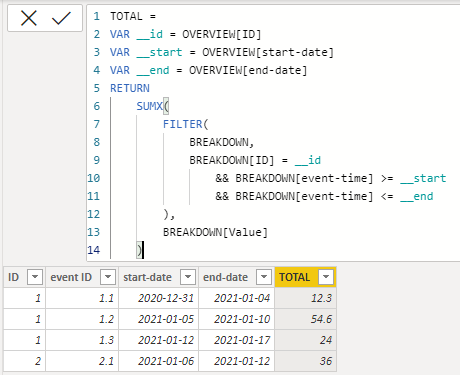
TOTAL =
VAR __id = OVERVIEW[ID]
VAR __start = OVERVIEW[start-date]
VAR __end = OVERVIEW[end-date]
RETURN
    SUMX(
        FILTER(
            BREAKDOWN,
            BREAKDOWN[ID] = __id
                && BREAKDOWN[event-time] >= __start
                && BREAKDOWN[event-time] <= __end
        ),
        BREAKDOWN[Value]
    )
| Thanks to the great efforts by MS engineers to simplify syntax of DAX! Most beginners are SUCCESSFULLY MISLED to think that they could easily master DAX; but it turns out that the intricacy of the most frequently used RANKX() is still way beyond their comprehension! |
DAX is simple, but NOT EASY! |
- Mark as New
- Bookmark
- Subscribe
- Mute
- Subscribe to RSS Feed
- Permalink
- Report Inappropriate Content
@CNENFRNL thank you so much for the above. The file that you sent over works.
I tried to replicate on my end but I have this error "A single value for column 'ID' in table 'OVERVIEW' cannot be determined. THis can happen when a measure formula refers to a column that contains many values without specifiying an aggregation such as min, max, count, or sum to get a single result."
- Mark as New
- Bookmark
- Subscribe
- Mute
- Subscribe to RSS Feed
- Permalink
- Report Inappropriate Content
I had changed all the data types similarly to how you had them.
Only difference here is that I had to add max() when defining the variables for it to be working for me. Might the difference in syntax be due to the different PowerBI desktop versions?
TOTAL =
VAR __id = MAX(OVERVIEW[ID])
VAR __start = MAX(OVERVIEW[start-date])
VAR __end = MAX(OVERVIEW[end-date])
- Mark as New
- Bookmark
- Subscribe
- Mute
- Subscribe to RSS Feed
- Permalink
- Report Inappropriate Content
@CNENFRNL thank you so much for the above. The file that you sent over works.
I tried to replicate on my end but I have this error "A single value for column 'ID' in table 'OVERVIEW' cannot be determined. THis can happen when a measure formula refers to a column that contains many values without specifiying an aggregation such as min, max, count, or sum to get a single result."
- Mark as New
- Bookmark
- Subscribe
- Mute
- Subscribe to RSS Feed
- Permalink
- Report Inappropriate Content
DesiredOutput =
CALCULATE(
    SUM( BREAKDOWN[Value] ),
    FILTER( BREAKDOWN, BREAKDOWN[ID] = OVERVIEW[ID] ),
    DATESBETWEEN( BREAKDOWN[event-time], OVERVIEW[start-date], OVERVIEW[end-date] )
)
I prefer
TOTAL =
VAR __id = OVERVIEW[ID]
VAR __start = OVERVIEW[start-date]
VAR __end = OVERVIEW[end-date]
RETURN
    SUMX(
        FILTER(
            BREAKDOWN,
            BREAKDOWN[ID] = __id
                && BREAKDOWN[event-time] >= __start
                && BREAKDOWN[event-time] <= __end
        ),
        BREAKDOWN[Value]
    )
| Thanks to the great efforts by MS engineers to simplify syntax of DAX! Most beginners are SUCCESSFULLY MISLED to think that they could easily master DAX; but it turns out that the intricacy of the most frequently used RANKX() is still way beyond their comprehension! |
DAX is simple, but NOT EASY! |
- Mark as New
- Bookmark
- Subscribe
- Mute
- Subscribe to RSS Feed
- Permalink
- Report Inappropriate Content
I now have a new requirement. I have successfully managed to obtained the "TOTAL". However, I have to multiply them by a factor specific to its category. I suspect that this is a SUMPRODUCT problem but have yet to modify the previous solution provided to achieve it.
OVERALL:
| ID | event ID | start-date | end-date |
| 1 | 1.1 | 2020-12-31 | 2021-01-04 |
| 1 | 1.2 | 2021-01-05 | 2021-01-10 |
| 1 | 1.3 | 2021-01-12 | 2021-01-17 |
| 2 | 2.1 | 2021-01-06 | 2021-01-12 |
BREAKDOWN: the difference between this breakdown table and previously mentioned, is that the "Value" column is further broken down by category
| ID | event-time | sub-category | Value |
| 1 | 2020-01-01 | A | 0.5 |
| 1 | 2020-01-01 | B | 0.2 |
| 1 | 2020-01-01 | C | 0.8 |
| 1 | 2020-01-02 | A | 0.9 |
| 1 | 2020-01-02 | B | 0.3 |
| 1 | 2020-01-02 | C | 0.6 |
Multiplication factor
| sub-category | multiplication factor |
| A | 1.7 |
| B | 1.2 |
| C | 1.9 |
Appreciate any help on this
Helpful resources

Power BI Monthly Update - November 2025
Check out the November 2025 Power BI update to learn about new features.

Fabric Data Days
Advance your Data & AI career with 50 days of live learning, contests, hands-on challenges, study groups & certifications and more!

FabCon Atlanta 2026
Join us at FabCon Atlanta, March 16-20, for the ultimate Fabric, Power BI, AI and SQL community-led event. Save $200 with code FABCOMM.

| User | Count |
|---|---|
| 10 | |
| 9 | |
| 6 | |
| 5 | |
| 3 |


