Get certified for free when you join Fabric Data Days 2026 and dive into Fabric, Power BI, SQL, AI, and other essential data skills.
Join nowData Days is here! Join us now for 60+ days of learning, challenges, and connection. Learn more
Hi All,
I would like to subtract lines in Power BI.
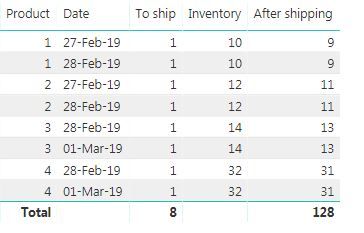
Substract lines based on product id and ship date. "After shipping "is calculated column which values are correct only for 1 line.
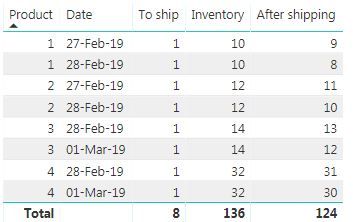
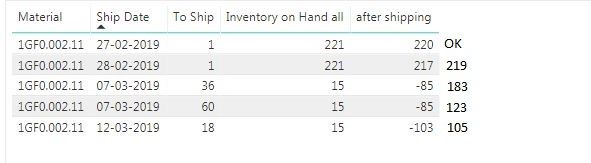
I would like to get below result.
Let me know if you need any informations.
Solved! Go to Solution.
@Anonymous ,
We don't need to create Table2. Please group Material in Power BI Desktop query editor, then create the following columns in table1. For more details, please check attached PBIX file.
shipcum = CALCULATE(SUM (Table1[To Ship] ),
ALLEXCEPT( Table1,Table1[Material]),
Table1[Index] <= EARLIER ( Table1[Index] ))
Column = CALCULATE(MAX(Table1[Inventory on Hand]),ALLEXCEPT(Table1,Table1[Material]),Table1[Index]=1)
After shipping = Table1[Column]-Table1[shipcum]
Regards,
Lydia
@Anonymous ,
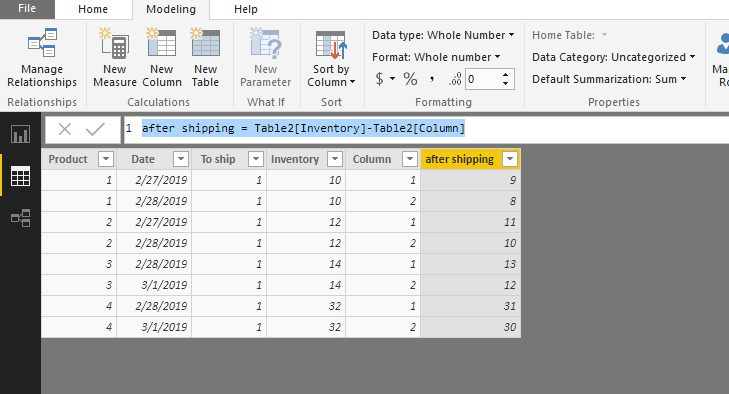
Please create the following columns in your table.
Column =
CALCULATE (
SUM ( Table[To ship] ),
ALLEXCEPT( Table,Table[Product]),
Table[Date] <= EARLIER ( Table[Date] )
)
after shipping = Table[Inventory]-Table[Column]
Regards,
Lydia
Hi Lydia,
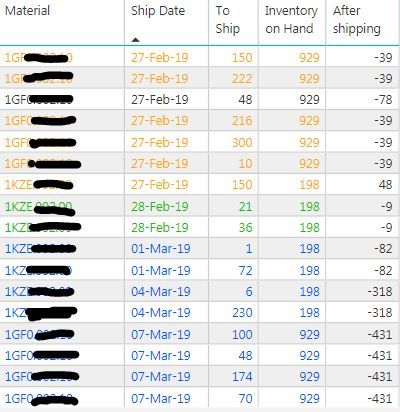
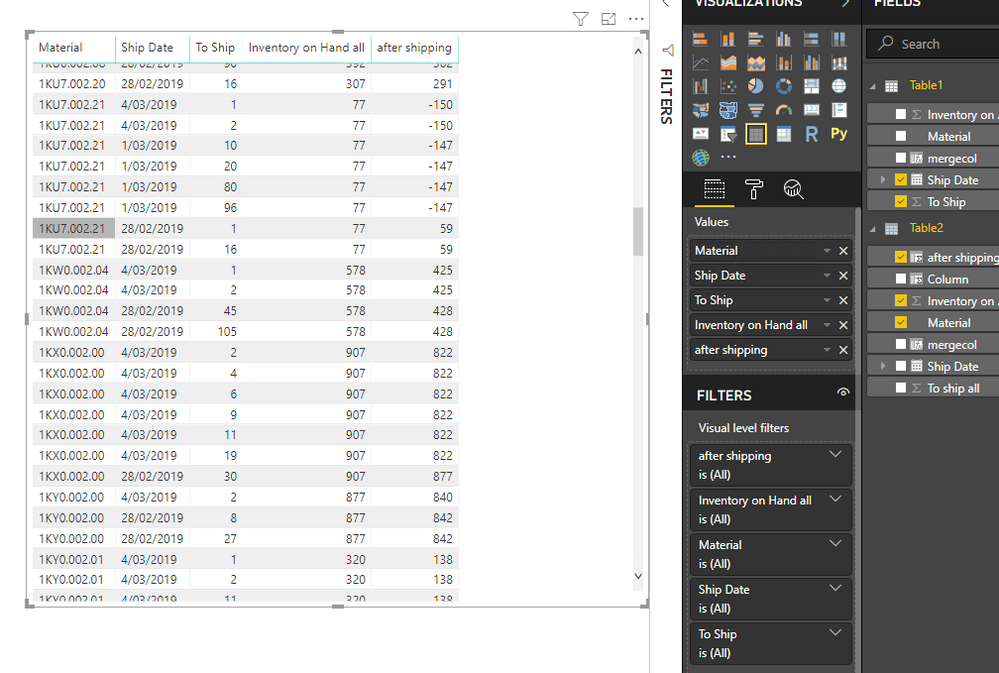
It looks like below, using above. Any idea what is wrong?
//Rasty
@Anonymous ,
Please firstly create a new table using dax below.
Table2 = SUMMARIZE(Table1,Table1[Material],Table1[Ship Date],"To ship all",SUM(Table1[To Ship]),"Inventory on Hand all", MAX(Table1[Inventory on Hand]))
Create the following columns in Table2.
mergecol = Table2[Material]&Table2[Ship Date]
Column =
CALCULATE (
SUM ( Table2[To ship all] ),
ALLEXCEPT( Table2,Table2[Material]),
Table2[Ship Date] <= EARLIER ( Table2[Ship Date] )
)
after shipping = Table2[Inventory on Hand all]-Table2[Column]
Create the following column in Table1.
mergecol = Table1[Material]&Table1[Ship Date]
Create relationship between tables using mergecol field. Then create a table visual as below. For more details, please check attached PBIX file.
Regards,
Lydia
Hi Lydia,
This is very impresive, very close but, I would desire more as below.
Thanks.
@Anonymous ,
We don't need to create Table2. Please group Material in Power BI Desktop query editor, then create the following columns in table1. For more details, please check attached PBIX file.
shipcum = CALCULATE(SUM (Table1[To Ship] ),
ALLEXCEPT( Table1,Table1[Material]),
Table1[Index] <= EARLIER ( Table1[Index] ))
Column = CALCULATE(MAX(Table1[Inventory on Hand]),ALLEXCEPT(Table1,Table1[Material]),Table1[Index]=1)
After shipping = Table1[Column]-Table1[shipcum]
Regards,
Lydia
@Anonymous ,
Could you please export the data of your table to Excel and share me the Excel? You can replace confidential data with dummy data.
Regards,
Lydia
Don't miss out on Data Days, June 15 through August 7. Learn Fabric, Power BI, SQL, AI and more.
Check out the May 2026 Power BI update to learn about new features.
| User | Count |
|---|---|
| 5 | |
| 4 | |
| 3 | |
| 2 | |
| 1 |
| User | Count |
|---|---|
| 11 | |
| 11 | |
| 5 | |
| 4 | |
| 3 |