Don't miss your chance to take the Fabric Data Engineer (DP-600) exam for FREE! Find out how by watching the DP-600 session on-demand now through April 28th.
Learn moreJoin the FabCon + SQLCon recap series. Up next: Power BI, Real-Time Intelligence, IQ and AI, and Data Factory take center stage. All sessions are available on-demand after the live show. Register now
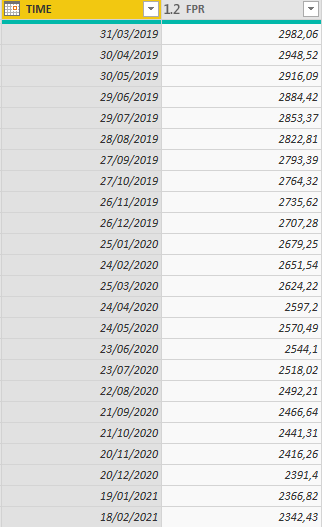
Hello, I´m tryin to substract rows from the same column (FPR), I need to substract the next value from the previous value acorrding to the date like this: FPR from 30/04/2019 - FPR from 31/03/2019, then 30/05/2019 - 30/04/2019 etc ...
Solved! Go to Solution.
Hi @OscarSuarez10,
sort the table by the column TIME, create an index column starting with 0 and use the following formula for addressing the previous row:
SortByTime = Table.Sort(#"Previous Step", {"TIME"}),
IndexColumn = Table.AddIndexColumn(SortByTime, "Index", 0, 1),
Substract = Table.AddColumn(IndexColumn, "Substract", each [FPR] - IndexColumn[FPR]{[Index] - 1})The value of current row: [FPR] or IndexColumn[FPR]{[Index]}
The value of previous row: IndexColumn[FPR]{[Index] - 1} - give me the value of column FPR on the index [Index] - 1.
Hi @OscarSuarez10,
sort the table by the column TIME, create an index column starting with 0 and use the following formula for addressing the previous row:
SortByTime = Table.Sort(#"Previous Step", {"TIME"}),
IndexColumn = Table.AddIndexColumn(SortByTime, "Index", 0, 1),
Substract = Table.AddColumn(IndexColumn, "Substract", each [FPR] - IndexColumn[FPR]{[Index] - 1})The value of current row: [FPR] or IndexColumn[FPR]{[Index]}
The value of previous row: IndexColumn[FPR]{[Index] - 1} - give me the value of column FPR on the index [Index] - 1.
Thank You for answering, that helped me a lot
But now I only have to substract the first value of 2019 and the last value of 2019, then the first value of 2020 and then the last value of 2020 etc ...
Hi @OscarSuarez10,
I see.
Please close this topic and open a new one, because it requires another approach. You can also mention me and I'll try to respond as soon as possible.
Check out the April 2026 Power BI update to learn about new features.
If you have recently started exploring Fabric, we'd love to hear how it's going. Your feedback can help with product improvements.
A new Power BI DataViz World Championship is coming this June! Don't miss out on submitting your entry.
| User | Count |
|---|---|
| 5 | |
| 3 | |
| 3 | |
| 3 | |
| 3 |
| User | Count |
|---|---|
| 8 | |
| 6 | |
| 5 | |
| 5 | |
| 4 |