cancel
Showing results for 
Search instead for 
Did you mean: 

Learn from the best! Meet the four finalists headed to the FINALS of the Power BI Dataviz World Championships! Register now

Reply
khaycock
Helper I
Helper I

Splitting data and transposing

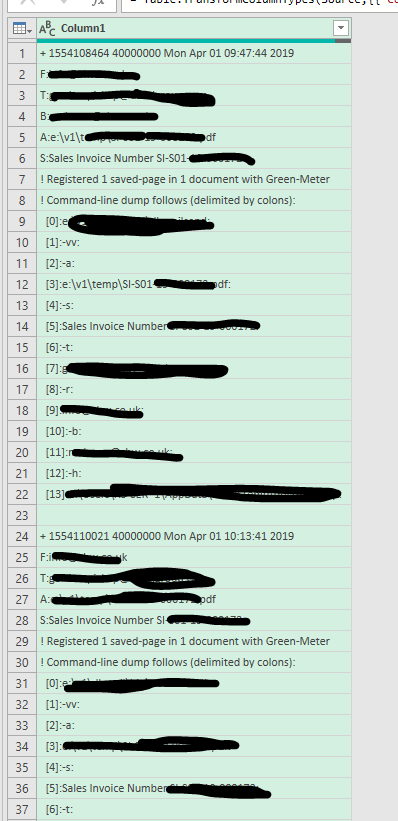
I have an email log that I was hoping to feed into an Excel spreadsheet using power query but it's all in one big column with no clear delimeter. Is there any way I can split each section where there is a gap in the data (row 23 in this first one) and turn it all into one single row of data with different columns before moving onto the next batch and doing the same?

 data.PNG

1 ACCEPTED SOLUTION
AlB
Community Champion
Community Champion

Hi @khaycock 

Place the following M code in a blank query to see the steps.

let
    Source = Table.FromRows(Json.Document(Binary.Decompress(Binary.FromText("i45WMlSK1YlWMgKTxmASTJiASVMwaYYQNgeTFmDSUik2FgA=", BinaryEncoding.Base64), Compression.Deflate)), let _t = ((type nullable text) meta [Serialized.Text = true]) in type table [Column1 = _t]),
    #"Changed Type" = Table.TransformColumnTypes(Source,{{"Column1", type text}}),

    col1_ = #"Changed Type"[Column1],
    out_ = List.Accumulate(col1_, [stateAll={}, stateItem = {}], (state, current)=> 
                     [stateAll= if current="" then state[stateAll] & {state[stateItem]} else state[stateAll], 
                      stateItem = if current<>"" then state[stateItem] &  {current} else {}] ), 
    res_ = if out_[stateItem] = {}  then out_[stateAll] else out_[stateAll] & {out_[stateItem]},
    res2_ = Table.FromColumns(List.Transform(res_, each {Text.Combine(_, "|")})) //Change here the separator between rows
in
    res2_


SU18_powerbi_badge

Please accept the solution when done and consider giving a thumbs up if posts are helpful. 

Contact me privately for support with any larger-scale BI needs, tutoring, etc.


View solution in original post

4 REPLIES 4
AlB
Community Champion
Community Champion

Hi @khaycock 

Place the following M code in a blank query to see the steps.

let
    Source = Table.FromRows(Json.Document(Binary.Decompress(Binary.FromText("i45WMlSK1YlWMgKTxmASTJiASVMwaYYQNgeTFmDSUik2FgA=", BinaryEncoding.Base64), Compression.Deflate)), let _t = ((type nullable text) meta [Serialized.Text = true]) in type table [Column1 = _t]),
    #"Changed Type" = Table.TransformColumnTypes(Source,{{"Column1", type text}}),

    col1_ = #"Changed Type"[Column1],
    out_ = List.Accumulate(col1_, [stateAll={}, stateItem = {}], (state, current)=> 
                     [stateAll= if current="" then state[stateAll] & {state[stateItem]} else state[stateAll], 
                      stateItem = if current<>"" then state[stateItem] &  {current} else {}] ), 
    res_ = if out_[stateItem] = {}  then out_[stateAll] else out_[stateAll] & {out_[stateItem]},
    res2_ = Table.FromColumns(List.Transform(res_, each {Text.Combine(_, "|")})) //Change here the separator between rows
in
    res2_


SU18_powerbi_badge

Please accept the solution when done and consider giving a thumbs up if posts are helpful. 

Contact me privately for support with any larger-scale BI needs, tutoring, etc.


Anonymous
Not applicable

I would do it this way, by replacing the empty row value with "$" then combining the text, splitting at the "$", then converting the newly split list back into a table.  Let's say your last step is currently "LastStep".  You can either add each step in the formula editor or paste into the advanced editor (you have to remove your current last comma, and use the "in" statement provided below):


#"Replaced Value" = Table.ReplaceValue(LastStep,"","$",Replacer.ReplaceValue,{"Column1"}),
Custom1 = Text.Combine(#"Replaced Value"[Column1]),
#"Split Text" = Text.Split(Custom1, "$"),
#"Converted to Table" = Table.FromList(#"Split Text", Splitter.SplitByNothing(), null, null, ExtraValues.Error)
in
#"Converted to Table"


--Nate


Jakinta
Solution Sage
Solution Sage

= Table.SplitColumn( Table.FromList( List.Transform(List.Split(PreviousStep[Column1],23), each Text.Combine(List.RemoveLastN(_,1), "/////"))), "Column1",Splitter.SplitTextByDelimiter("/////", QuoteStyle.Csv))

What do I put within PreviousStep?

Helpful resources

Announcements
Join our Fabric User Panel

Join our Fabric User Panel

Share feedback directly with Fabric product managers, participate in targeted research studies and influence the Fabric roadmap.

March Power BI Update Carousel

Power BI Community Update - March 2026

Check out the March 2026 Power BI update to learn about new features.