Don't miss your chance to take exam DP-600 or DP-700 on us!
Request nowLearn from the best! Meet the four finalists headed to the FINALS of the Power BI Dataviz World Championships! Register now
Hello,
Unfortunately I have a lot of messy data to cleanse.
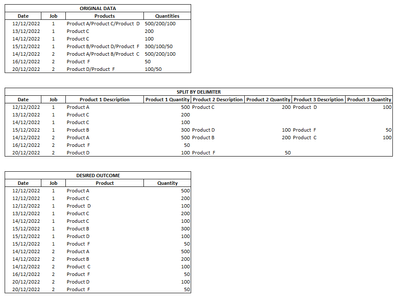
We get job order information with the date, job number, products (anywhere from 1 to 5 products) and quantities associated with the aforementioned products.
I have managed to split out the cell to multiple columns by using the split by delimiter function. However the desired outcome would have all products in one column and it's corresponding quanitity in another. I have tried pivoting/unpivoting, but I'm lost. Would appreciate any ideas how to tackle this.
Thanks
Solved! Go to Solution.
NewStep=#table(Table.ColumnNames(PreviousStepName),List.TransformMany(Table.ToRows(PreviousStepName),each List.Zip(List.Transform(List.Skip(_,2),each Text.Split(_,"/"))),(x,y)=>List.FirstN(x,2)&y))
As I only provided a sample of the data in my original post, I've gone on to attempt to use it with live data and there are some cells (in other columns) that are blank (null) in the query and that is causing it to error. Is there a way I can work around this without having to get rid of the null values. For example, there will not always be a job number assigned so the cell will be blank..
Thanks again for the start on the code.
NewStep=#table(Table.ColumnNames(PreviousStepName),List.TransformMany(Table.ToRows(PreviousStepName),each List.Zip(List.Transform(List.Skip(_,2),each if _=null then {null} else Text.Split(_,"/"))),(x,y)=>List.FirstN(x,2)&y))
You're a wizard! Thank you so much. Works perfectly!!
Share feedback directly with Fabric product managers, participate in targeted research studies and influence the Fabric roadmap.
Check out the February 2026 Power BI update to learn about new features.
| User | Count |
|---|---|
| 9 | |
| 9 | |
| 8 | |
| 7 | |
| 7 |