Join us in Barcelona for FabCon and SQLCon, September 28 - October 1, 2026.
This is best Fabric, Power BI, SQL and AI community event. How do we know? The last event sold out! Save €200 with code FABCMTY200.
Register now- Power BI forums
- Get Help with Power BI
- Desktop
- Service
- Report Server
- Power Query
- Mobile Apps
- Developer
- DAX Commands and Tips
- Custom Visuals Development Discussion
- Health and Life Sciences
- Power BI Spanish forums
- Translated Spanish Desktop
- Training and Consulting
- Instructor Led Training
- Dashboard in a Day for Women, by Women
- Galleries
- Data Stories Gallery
- Themes Gallery
- Contests Gallery
- QuickViz Gallery
- Quick Measures Gallery
- Visual Calculations Gallery
- Fabric Apps Gallery
- Notebook Gallery
- Translytical Task Flow Gallery
- TMDL Gallery
- R Script Showcase
- Webinars and Video Gallery
- Ideas
- Custom Visuals Ideas (read-only)
- Issues
- Issues
- Events
- Upcoming Events
July 28 - August 9 | Final Round of the Power BI Dataviz World Championships. This is your chance. Learn more
- Power BI forums
- Forums
- Get Help with Power BI
- Power Query
- Re: Split column into two columns
- Subscribe to RSS Feed
- Mark Topic as New
- Mark Topic as Read
- Float this Topic for Current User
- Bookmark
- Subscribe
- Printer Friendly Page

- Mark as New
- Bookmark
- Subscribe
- Mute
- Subscribe to RSS Feed
- Permalink
- Report Inappropriate Content
Split column into two columns
Hello all,
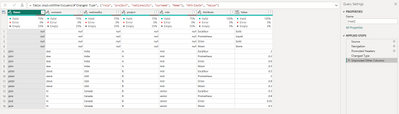
Im trying to split the data in a column "Value" into two collumns:
1. Value - will contains numbers only
2. Type - will contains all the text (Solid, Liquid, etc) in line with the corresponding Attribute
Table which I want to achieve should look like this:
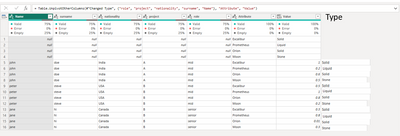
Ive tried Split column option, but cant make it work.
It works when using Column from example, but when I add new items (attribute and value), it wont recognize and assign wrong value to Attribute - so no GO option for me.
Any idea is appreciated.
Thanks
Solved! Go to Solution.


- Mark as New
- Bookmark
- Subscribe
- Mute
- Subscribe to RSS Feed
- Permalink
- Report Inappropriate Content
Hi @Anonymous
- Trim Attribute column (just to avoid extra "space" characters)
- Create a conditional column: if attribute = "Excalibur" then return "Solid" and so on...
- Remove first 4 rows


- Mark as New
- Bookmark
- Subscribe
- Mute
- Subscribe to RSS Feed
- Permalink
- Report Inappropriate Content
Hi,
let
Source = Your_Source,
Custom1 = List.RemoveFirstN(Table.ColumnNames(Source),5),
Custom2 = List.RemoveFirstN(Record.ToList(Source{0}),5),
Data = Table.AddColumn(Source, "Data", each Table.FromColumns({ Custom1 , Custom2, List.RemoveFirstN(Record.ToList(_),5)})),
Custom3 = Table.RemoveColumns(Data,Custom1)
in
Custom3
then Expand
Stéphane


- Mark as New
- Bookmark
- Subscribe
- Mute
- Subscribe to RSS Feed
- Permalink
- Report Inappropriate Content
Hi @Anonymous
Please provide a screenshot of the table before you unpivoted.
thanks
Joe
- Mark as New
- Bookmark
- Subscribe
- Mute
- Subscribe to RSS Feed
- Permalink
- Report Inappropriate Content
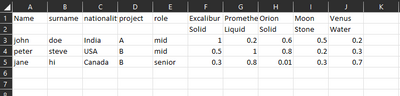
- Mark as New
- Bookmark
- Subscribe
- Mute
- Subscribe to RSS Feed
- Permalink
- Report Inappropriate Content
Hi @Anonymous
- Trim Attribute column (just to avoid extra "space" characters)
- Create a conditional column: if attribute = "Excalibur" then return "Solid" and so on...
- Remove first 4 rows
- Mark as New
- Bookmark
- Subscribe
- Mute
- Subscribe to RSS Feed
- Permalink
- Report Inappropriate Content
Thanks @mlsx4,
I understand the point of making the conditional columns, but in the future I will have more new attributes + values added and I want system to automatically recognize and link it with new value
- Mark as New
- Bookmark
- Subscribe
- Mute
- Subscribe to RSS Feed
- Permalink
- Report Inappropriate Content
And the point of create a duplication of the table after unpivot, filter (null values) for just keeping this:
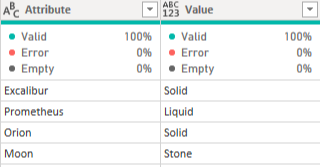
As a master table, and then combine values on the original one (having previously filtered out the null values)
- Mark as New
- Bookmark
- Subscribe
- Mute
- Subscribe to RSS Feed
- Permalink
- Report Inappropriate Content
Thanks @wdx223_Daniel
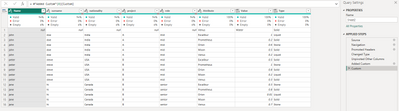
Ive tried to add custom column with the command u have provided, but it doesnt aligned right attributes with right values (ie: Excalibur is linked with Liquid, but should be Solid)
see picture below


- Mark as New
- Bookmark
- Subscribe
- Mute
- Subscribe to RSS Feed
- Permalink
- Report Inappropriate Content
NewStep=Table.AddColumn(Table.Skip(#"Unpiovted Other Columns",4),"Type",Function.ScalarVector(Value.Type(each _) as any,(t)=>let a=#"Unpiovted Other Columns"[Value] in List.Repeat(List.FirstN(a,4),List.Count(a)/4-1)))
Helpful resources

FabCon & SQLCon – Barcelona 2026
Join us in Barcelona for FabCon and SQLCon, the Fabric, Power BI, SQL, and AI community event. Save €200 with code FABCMTY200.

Power BI DataViz World Championships - June 2026
A new Power BI DataViz World Championship is coming this June! Don't miss out on submitting your entry.


