Get certified for free when you join Fabric Data Days 2026 and dive into Fabric, Power BI, SQL, AI, and other essential data skills.
Join nowData Days is here! Join us now for 60+ days of learning, challenges, and connection. Learn more
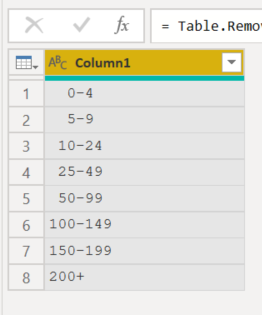
I have a table that I has a column recording the FTE for each company in the list. I have created an additional column that has created FTE ranges, i.e.:
0-4
5-9
10-24
25-49
50-99
100-149
150-199
200+
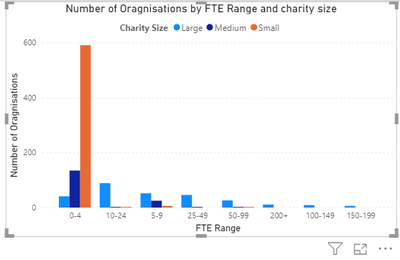
When I use the FTE Ranges as the axis on my visual, I can't sort in this order. If I try and sort by FTE Range it orders them as follows:
0-4
100-149
10-24
150-199
200+
25-49
50-99
5-9
Any ideas?
Solved! Go to Solution.
or better could use " " (2 blanks or 1 blank depending the number of digits) instead "0"
let
Source = Table.FromRecords(Json.Document(Binary.Decompress(Binary.FromText("i65WcgtxVbJSMtA1UarVgfEMDQx0DU0sUUR0jVBUmAJVWCKrMDIw0EbmmuqiGABUj6LcVBfIiwUA",BinaryEncoding.Base64),Compression.Deflate))),
sort = Table.Sort(Source, {each Number.From(Text.SplitAny([FTE],"-+"){0}), Order.Ascending})
in
sortIf my code solves your problem, mark it as a solution
@BJE - Use a separate colum with numeric sort values. Use the Sort By feature to sort your text column by your numeric column.
Thanks. Have tried that - not changing my visual.
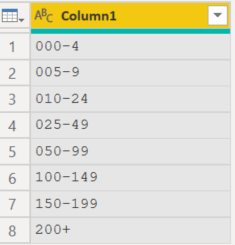
if it is not acceptable for aesthetic reasons, try somethonk like this
or better could use " " (2 blanks or 1 blank depending the number of digits) instead "0"
Thanks - this worked for me
Don't miss out on Data Days, June 15 through August 7. Learn Fabric, Power BI, SQL, AI and more.
Check out the May 2026 Power BI update to learn about new features.
| User | Count |
|---|---|
| 4 | |
| 4 | |
| 2 | |
| 2 | |
| 1 |
| User | Count |
|---|---|
| 11 | |
| 11 | |
| 5 | |
| 4 | |
| 4 |