cancel
Showing results for 
Search instead for 
Did you mean: 

The Power BI Data Visualization World Championships is back! It's time to submit your entry. Live now!

Reply
Anonymous
Not applicable

Sorting The Column Header

Hi, 

So i have this table going on and I want to Sort it by : 
-New Car
-In Warr
-Out Warr

-Aged Car

-Fence Sitter


The Age Type Column I couldn't see in my Query Editor as this is a "New column" that I created it in Power BI desktop.
I need help. Not sure on how to go further. 

1 ACCEPTED SOLUTION
Anonymous
Not applicable

Hi @Anonymous 


This is a screenshot of a visual, not of a table in PQ Editor, right?

There are not many reasons to re-order columns in the PQ Editor as it does not flow through to the Designer.


If this is a visual then:

1. Create a separate ranking table with two columns: "Headers" and "Rank". The rank would reflect the order you want the headers to appear on the visual.

2. Make a relation to this table from your original table to link headers to, what I guess is, one of your measures/columns.

3. Use the headers from this new table as headers for the table visual.

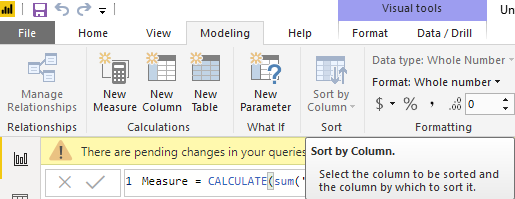
4. In this new table (in Designer) select the "Header" column and in the ribbon Modelling->Sort by Coumn select "Rank" instead of "Header".


PBI.png


This should re-order the table visual columns to what you want.


Kind regards,

JB

View solution in original post

1 REPLY 1
Anonymous
Not applicable

Hi @Anonymous 


This is a screenshot of a visual, not of a table in PQ Editor, right?

There are not many reasons to re-order columns in the PQ Editor as it does not flow through to the Designer.


If this is a visual then:

1. Create a separate ranking table with two columns: "Headers" and "Rank". The rank would reflect the order you want the headers to appear on the visual.

2. Make a relation to this table from your original table to link headers to, what I guess is, one of your measures/columns.

3. Use the headers from this new table as headers for the table visual.

4. In this new table (in Designer) select the "Header" column and in the ribbon Modelling->Sort by Coumn select "Rank" instead of "Header".


PBI.png


This should re-order the table visual columns to what you want.


Kind regards,

JB

Helpful resources

Announcements
FabCon Atlanta 2026 carousel

FabCon Atlanta 2026

Join us at FabCon Atlanta, March 16-20, for the ultimate Fabric, Power BI, AI and SQL community-led event. Save $200 with code FABCOMM.