This is best Fabric, Power BI, SQL and AI community event. How do we know? The last event sold out! Save €200 with code FABCMTY200.
Register nowA new Data Days event is coming soon! This time we’re going bigger than ever. Fabric, Power BI, SQL, AI and more. Don't miss out.
Hi,
So i have this table going on and I want to Sort it by :
-New Car
-In Warr
-Out Warr
-Aged Car
-Fence Sitter
The Age Type Column I couldn't see in my Query Editor as this is a "New column" that I created it in Power BI desktop.
I need help. Not sure on how to go further.
Solved! Go to Solution.
Hi @Anonymous
This is a screenshot of a visual, not of a table in PQ Editor, right?
There are not many reasons to re-order columns in the PQ Editor as it does not flow through to the Designer.
If this is a visual then:
1. Create a separate ranking table with two columns: "Headers" and "Rank". The rank would reflect the order you want the headers to appear on the visual.
2. Make a relation to this table from your original table to link headers to, what I guess is, one of your measures/columns.
3. Use the headers from this new table as headers for the table visual.
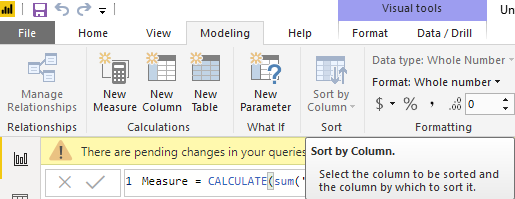
4. In this new table (in Designer) select the "Header" column and in the ribbon Modelling->Sort by Coumn select "Rank" instead of "Header".
This should re-order the table visual columns to what you want.
Kind regards,
JB
Hi @Anonymous
This is a screenshot of a visual, not of a table in PQ Editor, right?
There are not many reasons to re-order columns in the PQ Editor as it does not flow through to the Designer.
If this is a visual then:
1. Create a separate ranking table with two columns: "Headers" and "Rank". The rank would reflect the order you want the headers to appear on the visual.
2. Make a relation to this table from your original table to link headers to, what I guess is, one of your measures/columns.
3. Use the headers from this new table as headers for the table visual.
4. In this new table (in Designer) select the "Header" column and in the ribbon Modelling->Sort by Coumn select "Rank" instead of "Header".
This should re-order the table visual columns to what you want.
Kind regards,
JB
Check out the May 2026 Power BI update to learn about new features.
Sign up to receive a private message when registration opens and key events begin.
If you have recently started exploring Fabric, we'd love to hear how it's going. Your feedback can help with product improvements.
| User | Count |
|---|---|
| 7 | |
| 6 | |
| 6 | |
| 5 | |
| 4 |