cancel
Showing results for 
Search instead for 
Did you mean: 

We've captured the moments from FabCon & SQLCon that everyone is talking about, and we are bringing them to the community, live and on-demand. Starts on April 14th. Register now

Reply
sandraemma
Frequent Visitor

Sort columns based on string value

Hello,


I am stuck on something for many days that I think should be fairly easy and any ideas can help!

I have many different statuses (over 15 different, I only show few here) and I need to sort so that the correct status is the one row that is left. If the status is completed, the whole id and all rows shold be filtered away. 

Any idea on how I can sort the ids compared to the statuses? 

If statement or case? I am fairly new to dax and power bi so I am having a hard time finding the correct way of thinking. 


This is the example data

Idstatus
1

started

1processing
1ready
1completed
2started
2processing
3started
3processing
3ready


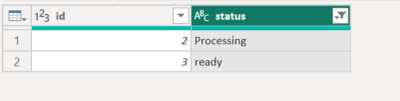
And this is the result I want:

idstatus
2processing
3ready
1 REPLY 1
ronrsnfld
Super User
Super User

  • Group by ID
  • Custom aggregation (need to use Advanced Filter) to return only the last item in the status column associated with that ID
  • Remove any rows that have a completed status
let
    Source = Table.FromColumns({
        {1,1,1,1,2,2,3,3,3},
        {"started","Processing","ready","completed","started","Processing","started","Processing","ready"}
        },
        type table[id=Int64.Type, status=text]
    ),

//Group by ID and return the "Last" item in the status column
    #"Grouped Rows" = Table.Group(Source, {"id"}, {
        {"status", each List.Last([status]), type text}}),

//Remove any rows where last status is "completed"
    #"Filtered Rows" = Table.SelectRows(#"Grouped Rows", each ([status] <> "completed"))
in
    #"Filtered Rows"


ronrsnfld_0-1675684315527.png


Helpful resources

Announcements
New to Fabric survey Carousel

New to Fabric Survey

If you have recently started exploring Fabric, we'd love to hear how it's going. Your feedback can help with product improvements.

Power BI DataViz World Championships carousel

Power BI DataViz World Championships - June 2026

A new Power BI DataViz World Championship is coming this June! Don't miss out on submitting your entry.

Join our Fabric User Panel

Join our Fabric User Panel

Share feedback directly with Fabric product managers, participate in targeted research studies and influence the Fabric roadmap.

March Power BI Update Carousel

Power BI Community Update - March 2026

Check out the March 2026 Power BI update to learn about new features.