Get certified for free when you join Fabric Data Days 2026 and dive into Fabric, Power BI, SQL, AI, and other essential data skills.
Join nowJuly 28 - August 9 | Final Round of the Power BI Dataviz World Championships. This is your chance. Learn more
Hello,
I am stuck on something for many days that I think should be fairly easy and any ideas can help!
I have many different statuses (over 15 different, I only show few here) and I need to sort so that the correct status is the one row that is left. If the status is completed, the whole id and all rows shold be filtered away.
Any idea on how I can sort the ids compared to the statuses?
If statement or case? I am fairly new to dax and power bi so I am having a hard time finding the correct way of thinking.
This is the example data
| Id | status |
| 1 | started |
| 1 | processing |
| 1 | ready |
| 1 | completed |
| 2 | started |
| 2 | processing |
| 3 | started |
| 3 | processing |
| 3 | ready |
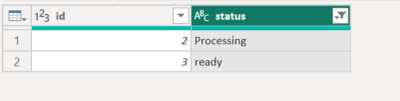
And this is the result I want:
| id | status |
| 2 | processing |
| 3 | ready |
let
Source = Table.FromColumns({
{1,1,1,1,2,2,3,3,3},
{"started","Processing","ready","completed","started","Processing","started","Processing","ready"}
},
type table[id=Int64.Type, status=text]
),
//Group by ID and return the "Last" item in the status column
#"Grouped Rows" = Table.Group(Source, {"id"}, {
{"status", each List.Last([status]), type text}}),
//Remove any rows where last status is "completed"
#"Filtered Rows" = Table.SelectRows(#"Grouped Rows", each ([status] <> "completed"))
in
#"Filtered Rows"
If you love stickers, then you will definitely want to check out our community sticker challenge, Barcelona edition!
Check out the July 2026 Power BI update to learn about new features.