cancel
Showing results for 
Search instead for 
Did you mean: 

Vote for your favorite vizzies from the Power BI Dataviz World Championship submissions. Vote now!

Reply
wmorris20
Helper II
Helper II

SharePoint On Premise Connection to Excel File

We have an enterprise data gateway succesfully setup, but I'm unable to figure out the connection string necessary to connect to an Excel file which is on premise and inside a subsite.


http://[site]/[subsite]/Shared%20Documents/[file.xlsx]


I haven't been able to find documentation that describes that string necessary (or even if this is possible).  I have been able to connect to a SharePoint folder at the root site, but I need a specific file within a subsite library.


Thanks for any help you can offer.


Capture.JPG


1 ACCEPTED SOLUTION
Anonymous
Not applicable

Hi @wmorris20,

Based on my test, you can use one of the following methods to connect to Excel on SharePoint subsite in Power BI Desktop.

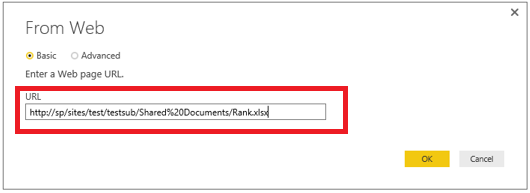
1. Copy URL of Excel file as shown in the following screenshot, then paste it to “Get Data>Web” entry in Power BI Desktop, please note that you would need to exclude “?Web=1” from URL of Excel file.
1.PNG2.PNG


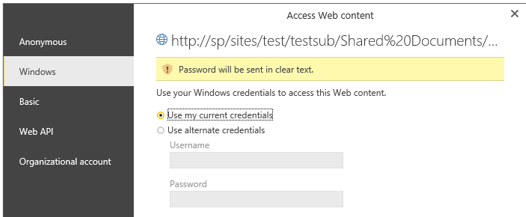
Then choose Windows method in the following screenshot, enter your account and password, you will be able to load data from your excel file.
2.1.PNG


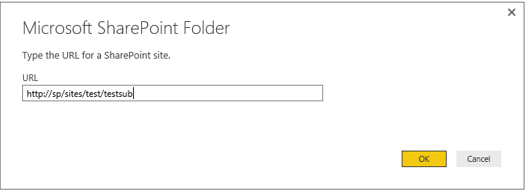
2. Paste URL of your SharePoint subsite in the following screenshot, choose Windows method in the next screenshot, enter your account and password.
3.PNG4.PNG


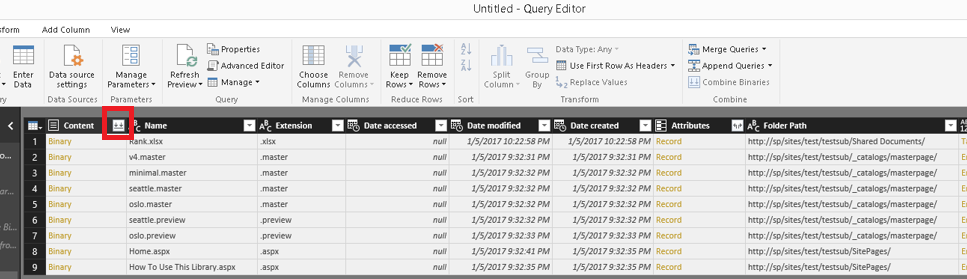
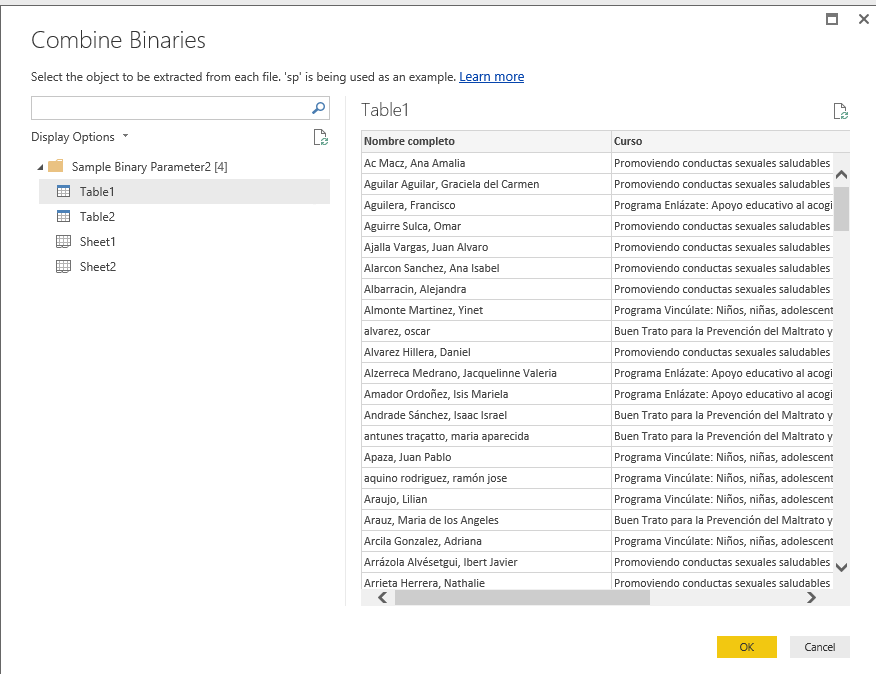
After loading data in Power BI Desktop, in the query editor window, there will be Content column, along with an icon that appears to be two down arrows. Click on the icon and you'll be able to select table or sheet from your excel file.
5.PNG6.PNG


Thanks,
Lydia Zhang

View solution in original post

2 REPLIES 2
Anonymous
Not applicable

Hi @wmorris20,

Based on my test, you can use one of the following methods to connect to Excel on SharePoint subsite in Power BI Desktop.

1. Copy URL of Excel file as shown in the following screenshot, then paste it to “Get Data>Web” entry in Power BI Desktop, please note that you would need to exclude “?Web=1” from URL of Excel file.
1.PNG2.PNG


Then choose Windows method in the following screenshot, enter your account and password, you will be able to load data from your excel file.
2.1.PNG


2. Paste URL of your SharePoint subsite in the following screenshot, choose Windows method in the next screenshot, enter your account and password.
3.PNG4.PNG


After loading data in Power BI Desktop, in the query editor window, there will be Content column, along with an icon that appears to be two down arrows. Click on the icon and you'll be able to select table or sheet from your excel file.
5.PNG6.PNG


Thanks,
Lydia Zhang

Thank you for the very detailed response and solution.

Helpful resources

Announcements
Power BI DataViz World Championships

Power BI Dataviz World Championships

Vote for your favorite vizzies from the Power BI World Championship submissions!

Sticker Challenge 2026 Carousel

Join our Community Sticker Challenge 2026

If you love stickers, then you will definitely want to check out our Community Sticker Challenge!

January Power BI Update Carousel

Power BI Monthly Update - January 2026

Check out the January 2026 Power BI update to learn about new features.

FabCon Atlanta 2026 carousel

FabCon Atlanta 2026

Join us at FabCon Atlanta, March 16-20, for the ultimate Fabric, Power BI, AI and SQL community-led event. Save $200 with code FABCOMM.

Users online (10,609)