Don't miss your chance to take the Fabric Data Engineer (DP-600) exam for FREE! Find out how by watching the DP-600 session on-demand now through April 28th.
Learn moreJoin the FabCon + SQLCon recap series. Up next: Power BI, Real-Time Intelligence, IQ and AI, and Data Factory take center stage. All sessions are available on-demand after the live show. Register now
Upon recent Salesforce updates or PBI updates, summary level SF reports are no longer pulling into PBI. With a 2,000 row limit, this is creating problems when trying to pull in any summary reports into PBI.
This was working in prior versions, any idea what changed? I saw a thread to udpate the API version being used, but that didn't solve it.
Current problem: business with 200,000 customers with one of 6 statuses. SF summary report to see how many customers per status which should be a table with 6 rows. SF summary report, customer name, grouped by status. The report in SF is correct, however when loaded into PBI, it pulls the raw table of customer name in column 1 and status in column 2. This exceeds the row limits of 2,000 and breaks. Any ideas how to fix and get back to loading a summary report.
Have tried to save as tabular, matrix and summary in SF Classic and lightning, didn't work.
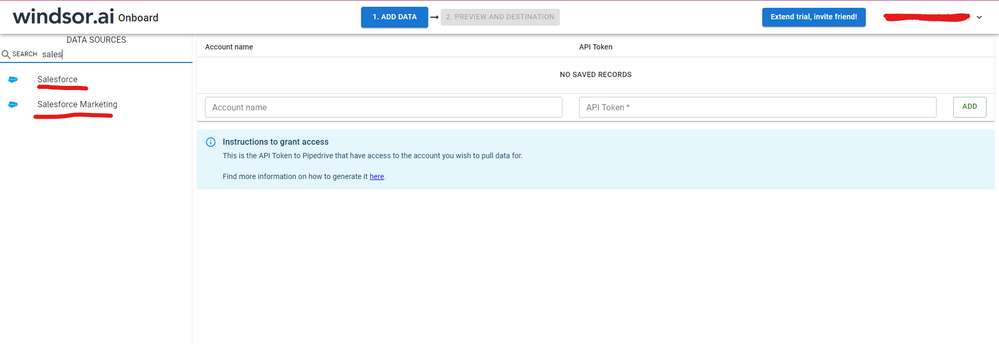
Hi, were you able to find a solution? As a workaround, maybe you can try to test your connection with a 3rd party connector. I've tried windsor.ai, supermetrics and funnel.io. I stayed with windsor because it is much cheaper so just to let you know other options. In case you wonder, to make the connection first search for the Salesforce connector in the data sources list:
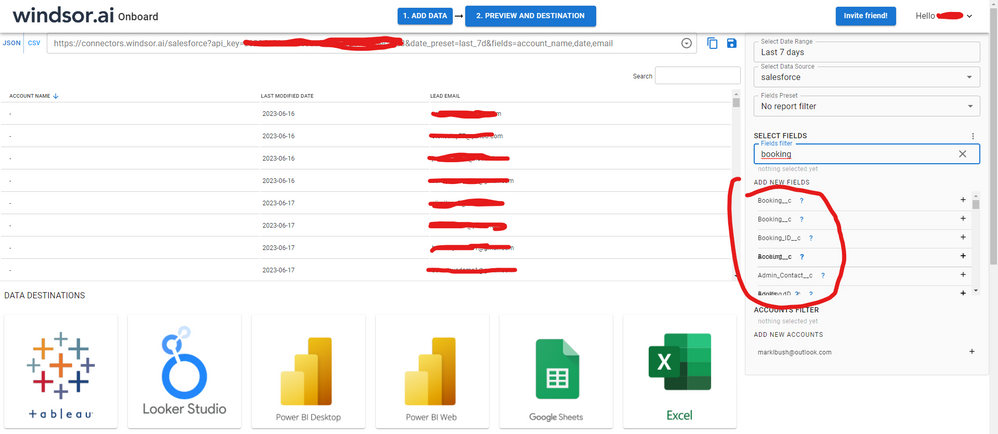
After that, just grant access to your Salesforce account using your credentials, then on preview and destination page you will see a preview of your Salesforce fields:
There just select the fields you need. It is also compatible with custom fields and custom objects, so you'll be able to export them through windsor. Finally, just select PBI as your data destination and finally just copy and paste the url on PBI --> Get Data --> Web --> Paste the url.
Hi @Anonymous ,
Hope the third - party blog can help you.
https://www.linkedin.com/pulse/power-bi-challenges-challenge-6-salesforce-only-allows-vitali-burla
This is just a link to a linkedIN article that you wrote outlining the limitations. It doesn't help at all....I understand the object connection, which doesn't help as the customer object has millions of records. Further, decreasing the report only provides sample data that isn't significant. Can we address the problem - something changed in the recent updates to SF to push detailed row data for summary reports eventhough that toggle is turned off....or perhaps PBI isn't making the request correctly.
Check out the April 2026 Power BI update to learn about new features.
If you have recently started exploring Fabric, we'd love to hear how it's going. Your feedback can help with product improvements.
A new Power BI DataViz World Championship is coming this June! Don't miss out on submitting your entry.
| User | Count |
|---|---|
| 6 | |
| 5 | |
| 5 | |
| 5 | |
| 4 |