cancel
Showing results for 
Search instead for 
Did you mean: 

Try your skills in the Power BI Dataviz World Championship! Round one ends June 26. Join now

Reply
Anonymous
Not applicable

Salesforce Report - Summary

Upon recent Salesforce updates or PBI updates, summary level SF reports are no longer pulling into PBI. With a 2,000 row limit, this is creating problems when trying to pull in any summary reports into PBI.


This was working in prior versions, any idea what changed? I saw a thread to udpate the API version being used, but that didn't solve it. 


Current problem: business with 200,000 customers with one of 6 statuses. SF summary report to see how many customers per status which should be a table with 6 rows. SF summary report, customer name, grouped by status. The report in SF is correct, however when loaded into PBI, it pulls the raw table of customer name in column 1 and status in column 2. This exceeds the row limits of 2,000 and breaks. Any ideas how to fix and get back to loading a summary report. 


Have tried to save as tabular, matrix and summary in SF Classic and lightning, didn't work. 

3 REPLIES 3
ReportBuilder07
Helper III
Helper III

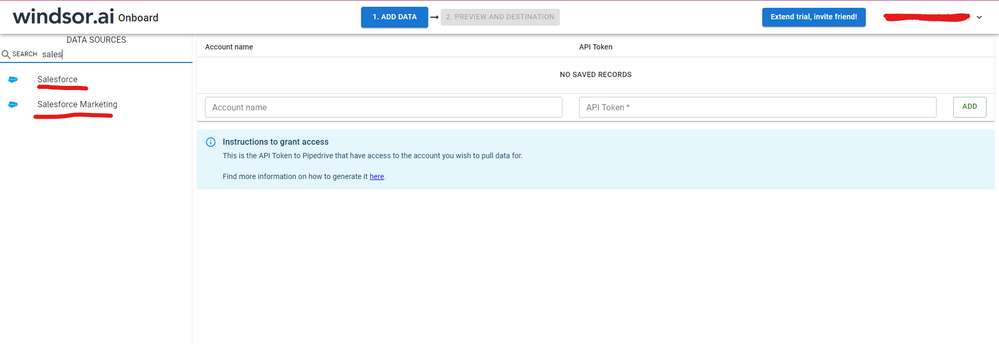
Hi, were you able to find a solution? As a workaround, maybe you can try to test your connection with a 3rd party connector. I've tried windsor.ai, supermetrics and funnel.io. I stayed with windsor because it is much cheaper so just to let you know other options. In case you wonder, to make the connection first search for the Salesforce connector in the data sources list:


SALESFORCE-1.png


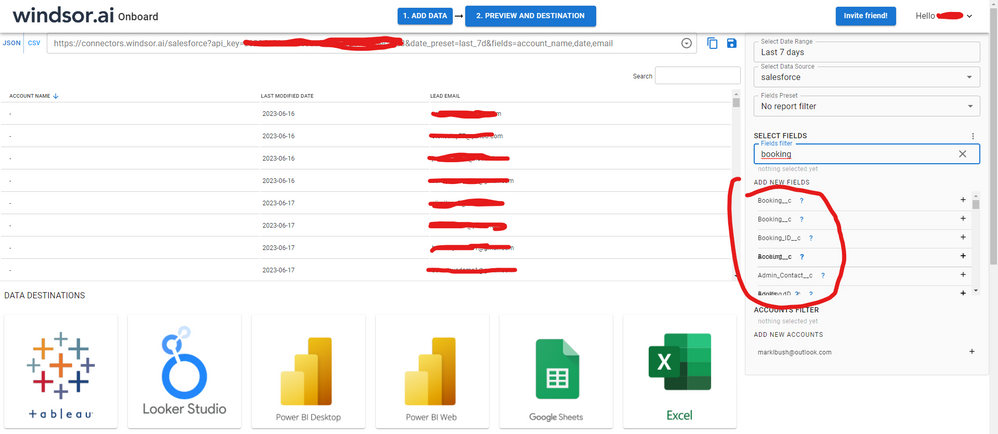
After that, just grant access to your Salesforce account using your credentials, then on preview and destination page you will see a preview of your Salesforce fields:


SALESFORCE-2.png


There just select the fields you need. It is also compatible with custom fields and custom objects, so you'll be able to export them through windsor.  Finally, just select PBI as your data destination and finally just copy and paste the url on PBI --> Get Data --> Web --> Paste the url. 


SELECT_DESTINATION_NEW.png

v-frfei-msft
Community Support
Community Support

Hi @Anonymous ,


Hope the third - party blog can help you.

https://www.linkedin.com/pulse/power-bi-challenges-challenge-6-salesforce-only-allows-vitali-burla


Community Support Team _ Frank
If this post helps, then please consider Accept it as the solution to help the others find it more quickly.
Anonymous
Not applicable

This is just a link to a linkedIN article that you wrote outlining the limitations. It doesn't help at all....I understand the object connection, which doesn't help as the customer object has millions of records. Further, decreasing the report only provides sample data that isn't significant. Can we address the problem - something changed in the recent updates to SF to push detailed row data for summary reports eventhough that toggle is turned off....or perhaps PBI isn't making the request correctly. 

Helpful resources

Announcements
Fabric Data Days is here Carousel

Fabric Data Days 2026

Don't miss out on Data Days, June 15 through August 7. Learn Fabric, Power BI, SQL, AI and more.

Power BI DataViz World Championships carousel

Power BI DataViz World Championships - June 2026

A new Power BI DataViz World Championship is coming this June! Don't miss out on submitting your entry.