cancel
Showing results for 
Search instead for 
Did you mean: 

The Power BI Data Visualization World Championships is back! Get ahead of the game and start preparing now! Learn more

Reply
tomshaw83
Helper I
Helper I

Return values in Power Query based on condition

Hi all,


I have a query for bringing through values in power query. I have a table which has values in column 1, and some values repeated in column 2 - the rest of column 2 is made up of null values. I would like a column 3 which returns the column 2 value, and the values from column 1 immediately preceding and following it. I have tried merging the table with itself, but find it difficult to generate column 3 - for which I think there may be a more elegant solution.


Column 1Column 2Column 3 
6null6
888
9null9
5nullnull
3nullnull
3null3
444
1null1
3nullnull
6null6
777
2null2
2nullnull
1 ACCEPTED SOLUTION
AlexisOlson
Super User
Super User

This isn't a very elegant solution but it's the first thing that I came up with:

let
    Source = Table.FromRows(Json.Document(Binary.Decompress(Binary.FromText("i45WMlPSUVKK1YlWsgAyLMAsS5iQKYxhjMEwATJMwCxDDDm4keZAhjmYZQQTgjBiAQ==", BinaryEncoding.Base64), Compression.Deflate)), let _t = ((type nullable text) meta [Serialized.Text = true]) in type table [#"Column 1" = _t, #"Column 2" = _t]),
    #"Changed Type" = Table.TransformColumnTypes(Source,{{"Column 1", Int64.Type}, {"Column 2", Int64.Type}}),
    Boolean = List.Transform(#"Changed Type"[Column 2], each if _ <> null then 1 else 0),
    Combine = List.Transform(
                List.Zip(
                    {
                        Boolean,
                        List.RemoveFirstN(Boolean, 1) & {0},
                        {0} & List.RemoveLastN(Boolean, 1)
                    }
                ), each List.Max(_)
            ),
    AddToTable = Table.FromColumns(Table.ToColumns(#"Changed Type") & {Combine}, Table.ColumnNames(#"Changed Type") & {"Boolean"}),
    AddColumn3 = Table.FromRecords(Table.TransformRows(AddToTable, each _ & [#"Column 3" = if [Boolean] = 1 then [Column 1] else null])),
    #"Changed Type1" = Table.TransformColumnTypes(AddColumn3,{{"Column 1", Int64.Type}, {"Column 2", Int64.Type}, {"Boolean", Int64.Type}, {"Column 3", Int64.Type}})
in
    #"Changed Type1"
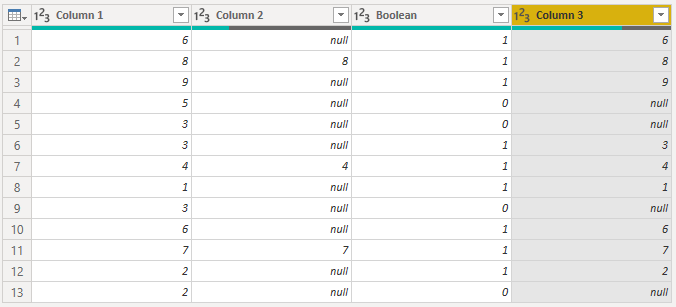
AlexisOlson_0-1643301734692.png

View solution in original post

2 REPLIES 2
AlexisOlson
Super User
Super User

This isn't a very elegant solution but it's the first thing that I came up with:

let
    Source = Table.FromRows(Json.Document(Binary.Decompress(Binary.FromText("i45WMlPSUVKK1YlWsgAyLMAsS5iQKYxhjMEwATJMwCxDDDm4keZAhjmYZQQTgjBiAQ==", BinaryEncoding.Base64), Compression.Deflate)), let _t = ((type nullable text) meta [Serialized.Text = true]) in type table [#"Column 1" = _t, #"Column 2" = _t]),
    #"Changed Type" = Table.TransformColumnTypes(Source,{{"Column 1", Int64.Type}, {"Column 2", Int64.Type}}),
    Boolean = List.Transform(#"Changed Type"[Column 2], each if _ <> null then 1 else 0),
    Combine = List.Transform(
                List.Zip(
                    {
                        Boolean,
                        List.RemoveFirstN(Boolean, 1) & {0},
                        {0} & List.RemoveLastN(Boolean, 1)
                    }
                ), each List.Max(_)
            ),
    AddToTable = Table.FromColumns(Table.ToColumns(#"Changed Type") & {Combine}, Table.ColumnNames(#"Changed Type") & {"Boolean"}),
    AddColumn3 = Table.FromRecords(Table.TransformRows(AddToTable, each _ & [#"Column 3" = if [Boolean] = 1 then [Column 1] else null])),
    #"Changed Type1" = Table.TransformColumnTypes(AddColumn3,{{"Column 1", Int64.Type}, {"Column 2", Int64.Type}, {"Boolean", Int64.Type}, {"Column 3", Int64.Type}})
in
    #"Changed Type1"

AlexisOlson_0-1643301734692.png

Thank you

Helpful resources

Announcements
Power BI DataViz World Championships

Power BI Dataviz World Championships

The Power BI Data Visualization World Championships is back! Get ahead of the game and start preparing now!

December 2025 Power BI Update Carousel

Power BI Monthly Update - December 2025

Check out the December 2025 Power BI Holiday Recap!

FabCon Atlanta 2026 carousel

FabCon Atlanta 2026

Join us at FabCon Atlanta, March 16-20, for the ultimate Fabric, Power BI, AI and SQL community-led event. Save $200 with code FABCOMM.

Top Solution Authors