
cancel
Showing results for 
Search instead for 
Did you mean: 

The Power BI Data Visualization World Championships is back! Get ahead of the game and start preparing now! Learn more

Reply
Anonymous
Not applicable

Retrieving Data Error

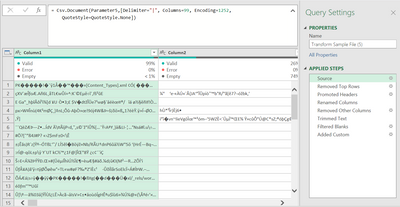
Hi, I did a query time ago that was working perfectly until today and it started retrieving data like this:


emilianoalvz_0-1670893957103.png


We didn't modify the file, the data source or the steps, and I tried different things but couldn't fix it.

Does anyone have any idea of why this is happening and how to fix it? 

Thanks. 

1 ACCEPTED SOLUTION
PhilipTreacy
Super User
Super User

Hi @Anonymous 


Looks like that 503 error from Sharepoint is the issue.  WHatever it's returngin to the query is being read as binary data - hence the odd characters you are seeing.


Check Sharepoint and reconfirm that you can accesss the files you want.


Regards


Phil


Did I answer your question? Then please mark my post as the solution.
If I helped you, click on the Thumbs Up to give Kudos.


Blog :: YouTube Channel :: Connect on Linkedin


Proud to be a Super User!


View solution in original post

3 REPLIES 3
PhilipTreacy
Super User
Super User

Hi @Anonymous 


Looks like that 503 error from Sharepoint is the issue.  WHatever it's returngin to the query is being read as binary data - hence the odd characters you are seeing.


Check Sharepoint and reconfirm that you can accesss the files you want.


Regards


Phil


Did I answer your question? Then please mark my post as the solution.
If I helped you, click on the Thumbs Up to give Kudos.


Blog :: YouTube Channel :: Connect on Linkedin


Proud to be a Super User!


PhilipTreacy
Super User
Super User

Hi @Anonymous 


So the CSV file you are importing is actually a text CSV?  Not binary?


Can you confirm Parameter5 contains the correct path and filename for the CSV? Try hardcoding the path/filename to test.


Can you post the CSV in question for me to check.


Regards


Phil


Did I answer your question? Then please mark my post as the solution.
If I helped you, click on the Thumbs Up to give Kudos.


Blog :: YouTube Channel :: Connect on Linkedin


Proud to be a Super User!


Anonymous
Not applicable

Hi Philip, thanks for taking the time.  

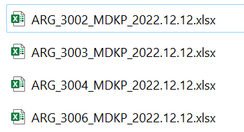
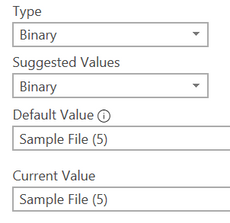
The CSV I'm importing are actually Excel files; xlsx, and all the Parameters that I had, they were automatically labelled as Binary, and worked always fine. 

emilianoalvz_0-1670908229894.png

emilianoalvz_0-1670909551345.png


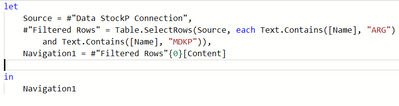
The Parameter5 contains the correct Path and filename. The files are placed into a Sharepoint and we retrieve the data from there. 

emilianoalvz_3-1670908723902.png


I don't know if the query might get corrupted by any reason, but I also got this error message and I think it has to do with that, Error 503, which actually is a Server-side problem. 

emilianoalvz_4-1670908881726.png


Helpful resources

Announcements
Power BI DataViz World Championships

Power BI Dataviz World Championships

The Power BI Data Visualization World Championships is back! Get ahead of the game and start preparing now!

December 2025 Power BI Update Carousel

Power BI Monthly Update - December 2025

Check out the December 2025 Power BI Holiday Recap!

FabCon Atlanta 2026 carousel

FabCon Atlanta 2026

Join us at FabCon Atlanta, March 16-20, for the ultimate Fabric, Power BI, AI and SQL community-led event. Save $200 with code FABCOMM.