Don't miss your chance to take the Fabric Data Engineer (DP-600) exam for FREE! Find out how by watching the DP-600 session on-demand now through April 28th.
Learn moreJoin the FabCon + SQLCon recap series. Up next: Power BI, Real-Time Intelligence, IQ and AI, and Data Factory take center stage. All sessions are available on-demand after the live show. Register now
Hi,
I have a table consisting of columns
| Product | Type | Metric | Year |
Each product undergoes checking twice Review and FInal. A Metric is given to it.
Sample data
| Product | Type | Metric | Year |
| A | Final | 3 | 2014 |
| A | Final | 3 | 2015 |
| A | Final | 3 | 2016 |
| A | Final | 3 | 2017 |
| A | Final | 4 | 2018 |
| A | Final | 4 | 2019 |
| A | Final | 4 | 2020 |
| A | Final | 4 | 2023 |
| A | Review | 4 | 2018 |
| A | Review | 4 | 2019 |
| A | Review | 4 | 2020 |
| A | Review | 4 | 2023 |
| CH | Final | 4 | 2014 |
| CH | Final | 4 | 2016 |
| CH | Final | 4 | 2018 |
| CH | Final | 4 | 2020 |
| CH | Final | 5 | 2022 |
| CH | Review | 4 | 2018 |
| CH | Review | 4 | 2020 |
| IA | Final | 3 | 2014 |
| IA | Final | 4 | 2016 |
| IA | Final | 4 | 2018 |
| IA | Final | 4 | 2020 |
| IA | Final | 5 | 2022 |
| IA | Review | 5 | 2018 |
| IA | Review | 5 | 2020 |
| IS | Final | 4 | 2014 |
| IS | Final | 4 | 2015 |
| IS | Final | 4 | 2016 |
| IS | Final | 4 | 2017 |
| IS | Final | 4 | 2018 |
| IS | Final | 4 | 2019 |
| IS | Final | 4 | 2020 |
| IS | Final | 4 | 2023 |
| IS | Review | 4 | 2018 |
| IS | Review | 4 | 2019 |
| IS | Review | 5 | 2020 |
| IS | Review | 4 | 2023 |
I need help in power query to retrieve the previous row value of metric by Product/Type/Year .
Expected trasnformed output in the column previous metric
| Product | Type | Metric | Year | Previous Metric |
| A | Final | 3 | 2014 | |
| A | Final | 3 | 2015 | 3 |
| A | Final | 3 | 2016 | 3 |
| A | Final | 3 | 2017 | 3 |
| A | Final | 4 | 2018 | 3 |
| A | Final | 4 | 2019 | 4 |
| A | Final | 4 | 2020 | 4 |
| A | Final | 4 | 2023 | 4 |
| A | Review | 4 | 2018 | |
| A | Review | 4 | 2019 | 4 |
| A | Review | 4 | 2020 | 4 |
| A | Review | 4 | 2023 | 4 |
| CH | Final | 4 | 2014 | |
| CH | Final | 4 | 2016 | 4 |
| CH | Final | 4 | 2018 | 4 |
| CH | Final | 4 | 2020 | 4 |
| CH | Final | 5 | 2022 | 4 |
| CH | Review | 4 | 2018 | |
| CH | Review | 4 | 2020 | 4 |
| IA | Final | 3 | 2014 | |
| IA | Final | 4 | 2016 | 3 |
| IA | Final | 4 | 2018 | 4 |
| IA | Final | 4 | 2020 | 4 |
| IA | Final | 5 | 2022 | 4 |
| IA | Review | 5 | 2018 | |
| IA | Review | 5 | 2020 | 5 |
| IS | Final | 4 | 2014 | |
| IS | Final | 4 | 2015 | 4 |
| IS | Final | 4 | 2016 | 4 |
| IS | Final | 4 | 2017 | 4 |
| IS | Final | 4 | 2018 | 4 |
| IS | Final | 4 | 2019 | 4 |
| IS | Final | 4 | 2020 | 4 |
| IS | Final | 4 | 2023 | 4 |
| IS | Review | 4 | 2018 | |
| IS | Review | 4 | 2019 | 4 |
| IS | Review | 5 | 2020 | 4 |
| IS | Review | 4 | 2023 | 5 |
Any help will be appreciated.
Cheers
Cheenusing
Solved! Go to Solution.
Hi @Anonymous ,
Here's one way to do it using two offset Index columns and merging the table on itself:
let
Source = Table.FromRows(Json.Document(Binary.Decompress(Binary.FromText("ddK9DoQgEATgd6G28BAQSmNijvauNBZXWJhcLPX1NcL9ADMFofiSnWWXcRSdqMSwrK/3eTfnkfVNiamCoBkYBm0BKoBl4AjImkHzhce8LfOOQnJxTP5icgk5/b3sWVExVCyT2EEiOoj8CX4qoljP00V7sAVDxTJBOUnfPhmqLspl9Kn3ZPNGoqkYKi0VS8Ux4V3H/3MJ3h4kB6gcEPir0wE=", BinaryEncoding.Base64), Compression.Deflate)), let _t = ((type nullable text) meta [Serialized.Text = true]) in type table [Product = _t, Type = _t, Metric = _t, Year = _t]),
sortProductTypeYear = Table.Sort(Source,{{"Product", Order.Ascending}, {"Type", Order.Ascending}, {"Year", Order.Ascending}}),
addIndex1 = Table.AddIndexColumn(sortProductTypeYear, "Index1", 1, 1, Int64.Type),
addIndex0 = Table.AddIndexColumn(addIndex1, "Index0", 0, 1, Int64.Type),
mergeOnSelf = Table.NestedJoin(addIndex0, {"Product", "Type", "Index0"}, addIndex0, {"Product", "Type", "Index1"}, "addIndex", JoinKind.LeftOuter),
expandPreviousMetric = Table.ExpandTableColumn(mergeOnSelf, "addIndex", {"Metric"}, {"PreviousMetric"}),
remOthCols = Table.SelectColumns(expandPreviousMetric,{"Product", "Type", "Metric", "Year", "PreviousMetric"})
in
remOthCols
To get this output:
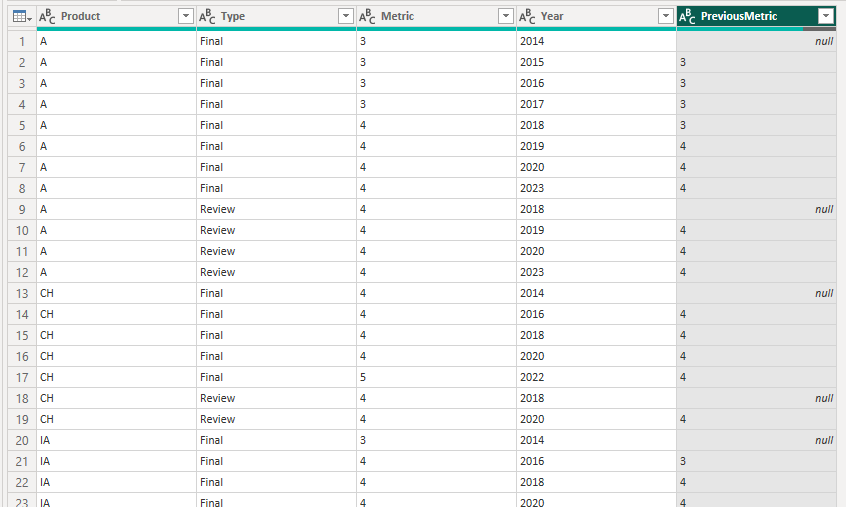
Pete
Proud to be a Datanaut!
hello, @Anonymous
s = your_table,
f = (x) =>
[a = Table.ToColumns(x),
b = Table.FromColumns(a & {{null} & List.RemoveLastN(x[Metric], 1)}, Table.ColumnNames(x) & {"Previous Metric"})][b],
g = Table.Group(s, {"Product", "Type"}, {{"pm", (x) => f(Table.Sort(x, "Year"))}}),
z = Table.ExpandTableColumn(g, "pm", {"Metric", "Year", "Previous Metric"})
hello, @Anonymous
s = your_table,
f = (x) =>
[a = Table.ToColumns(x),
b = Table.FromColumns(a & {{null} & List.RemoveLastN(x[Metric], 1)}, Table.ColumnNames(x) & {"Previous Metric"})][b],
g = Table.Group(s, {"Product", "Type"}, {{"pm", (x) => f(Table.Sort(x, "Year"))}}),
z = Table.ExpandTableColumn(g, "pm", {"Metric", "Year", "Previous Metric"})
@Anonymous Can't do step by step. I'll explain the idea.
f = (x) => is custom function (it's not a step) that takes a table as an argument. It takes a column with metric, "shifts it down" by one item (cuts the tail of the list and adds null as first item: {null} & List.RemoveLastN(x[Metric], 1)) so that we have a list with previous metrics values. Then we simply split table x to a list of columns (Table.ToColumns), add a list with shifted metrics values to it and transform this updated list of columns back to table (Table.FromColumns).
Function f must be applied to a group of rows with the same values of Product and Type. That what Table.Group does. Then we simply create new aggregated column pm, sort each table by year and apply our transformation f . Expand some columns from transformed table in the end (Table.ExpandTableColumn).
Hi @Anonymous ,
Here's one way to do it using two offset Index columns and merging the table on itself:
let
Source = Table.FromRows(Json.Document(Binary.Decompress(Binary.FromText("ddK9DoQgEATgd6G28BAQSmNijvauNBZXWJhcLPX1NcL9ADMFofiSnWWXcRSdqMSwrK/3eTfnkfVNiamCoBkYBm0BKoBl4AjImkHzhce8LfOOQnJxTP5icgk5/b3sWVExVCyT2EEiOoj8CX4qoljP00V7sAVDxTJBOUnfPhmqLspl9Kn3ZPNGoqkYKi0VS8Ux4V3H/3MJ3h4kB6gcEPir0wE=", BinaryEncoding.Base64), Compression.Deflate)), let _t = ((type nullable text) meta [Serialized.Text = true]) in type table [Product = _t, Type = _t, Metric = _t, Year = _t]),
sortProductTypeYear = Table.Sort(Source,{{"Product", Order.Ascending}, {"Type", Order.Ascending}, {"Year", Order.Ascending}}),
addIndex1 = Table.AddIndexColumn(sortProductTypeYear, "Index1", 1, 1, Int64.Type),
addIndex0 = Table.AddIndexColumn(addIndex1, "Index0", 0, 1, Int64.Type),
mergeOnSelf = Table.NestedJoin(addIndex0, {"Product", "Type", "Index0"}, addIndex0, {"Product", "Type", "Index1"}, "addIndex", JoinKind.LeftOuter),
expandPreviousMetric = Table.ExpandTableColumn(mergeOnSelf, "addIndex", {"Metric"}, {"PreviousMetric"}),
remOthCols = Table.SelectColumns(expandPreviousMetric,{"Product", "Type", "Metric", "Year", "PreviousMetric"})
in
remOthCols
To get this output:
Pete
Proud to be a Datanaut!
Check out the April 2026 Power BI update to learn about new features.
If you have recently started exploring Fabric, we'd love to hear how it's going. Your feedback can help with product improvements.
A new Power BI DataViz World Championship is coming this June! Don't miss out on submitting your entry.
| User | Count |
|---|---|
| 5 | |
| 3 | |
| 3 | |
| 3 | |
| 3 |
| User | Count |
|---|---|
| 8 | |
| 6 | |
| 5 | |
| 5 | |
| 4 |