Join us at FabCon Atlanta from March 16 - 20, 2026, for the ultimate Fabric, Power BI, AI and SQL community-led event. Save $200 with code FABCOMM.
Register now!Vote for your favorite vizzies from the Power BI Dataviz World Championship submissions. Vote now!
Hi team,
I have a PowerBI report published as a dashboard with an AzureBlob Datasource.
When the AzureBlob dataset refreshes, I want to save the previous version of the report/dashboard before the report is refreshed.
How can i achieve this?
Hi @v-himyad,
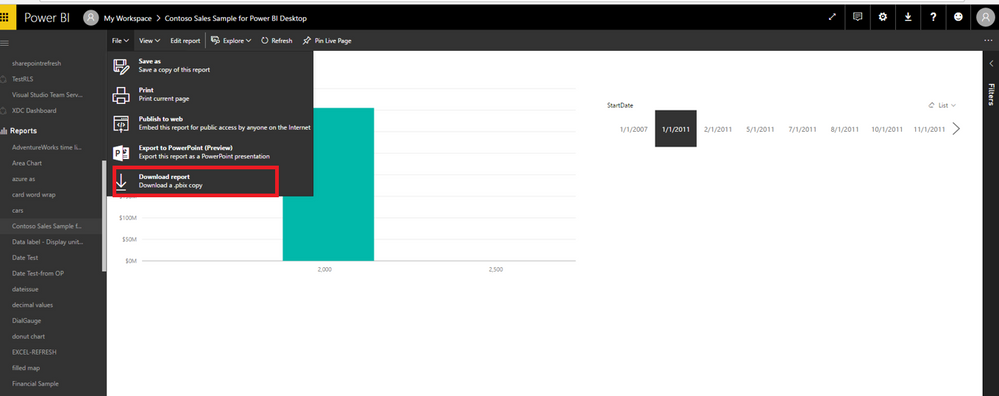
In Power BI Service, you can manually download the report using the option shown as below, it will download a PBIX file. You can rename the file with different names each time you download it before the report is refreshed.
Thanks,
Lydia Zhang
Hi Lydia,
Thanks for your support.
However, I want to automate this process of saving .pbix files into blob storage. Is this possible?
And, as you told to save each version of the report by a different name. Since AzureBlob is a direct connection won't all versions saved will get refreshed according to the latest dataset present in the blob?
Hi @v-himyad,
The download operation of PBIX file from Power BI Service is manual. As you want to store PBIX file into Azure blob storage, you can use AzCopy command line utility which is introduced in this blog.
Besides, Power BI Service reports that based on Azure blob data source will be automatically refreshed according to the changes in the data source.
Thanks,
Lydia Zhang
Vote for your favorite vizzies from the Power BI World Championship submissions!
If you love stickers, then you will definitely want to check out our Community Sticker Challenge!
Check out the January 2026 Power BI update to learn about new features.
| User | Count |
|---|---|
| 7 | |
| 6 | |
| 4 | |
| 3 | |
| 3 |
| User | Count |
|---|---|
| 14 | |
| 14 | |
| 12 | |
| 7 | |
| 6 |