FabCon is coming to Atlanta
Join us at FabCon Atlanta from March 16 - 20, 2026, for the ultimate Fabric, Power BI, AI and SQL community-led event. Save $200 with code FABCOMM.
Register now!- Power BI forums
- Get Help with Power BI
- Desktop
- Service
- Report Server
- Power Query
- Mobile Apps
- Developer
- DAX Commands and Tips
- Custom Visuals Development Discussion
- Health and Life Sciences
- Power BI Spanish forums
- Translated Spanish Desktop
- Training and Consulting
- Instructor Led Training
- Dashboard in a Day for Women, by Women
- Galleries
- Data Stories Gallery
- Themes Gallery
- Contests Gallery
- QuickViz Gallery
- Quick Measures Gallery
- Visual Calculations Gallery
- Notebook Gallery
- Translytical Task Flow Gallery
- TMDL Gallery
- R Script Showcase
- Webinars and Video Gallery
- Ideas
- Custom Visuals Ideas (read-only)
- Issues
- Issues
- Events
- Upcoming Events
Vote for your favorite vizzies from the Power BI Dataviz World Championship submissions. Vote now!
- Power BI forums
- Forums
- Get Help with Power BI
- Power Query
- Re: Replace null with if statement
- Subscribe to RSS Feed
- Mark Topic as New
- Mark Topic as Read
- Float this Topic for Current User
- Bookmark
- Subscribe
- Printer Friendly Page

- Mark as New
- Bookmark
- Subscribe
- Mute
- Subscribe to RSS Feed
- Permalink
- Report Inappropriate Content
Replace null with if statement
Hello,
I have a table shown in the following screenshot:
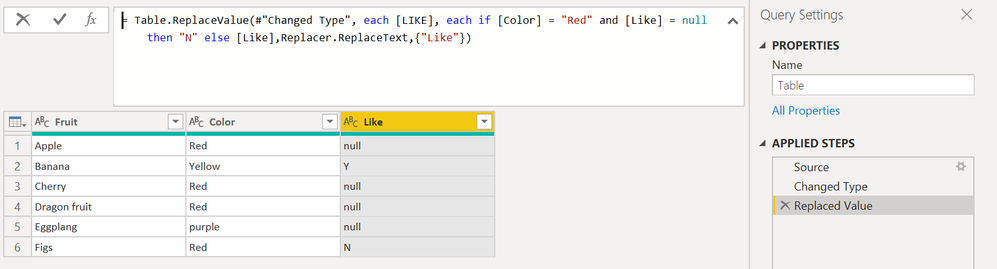
What I want to do is: if column Color is Red AND column Like is null, replace the null in the Like column with "N".
Therefore, the Like column of Apple, Cherry and Dragon fruit should be N.
However, the following syntax does not work:
= Table.ReplaceValue(#"Changed Type", each [LIKE], each if [Color] = "Red" and [Like] = null then "N" else [Like],Replacer.ReplaceText,{"Like"})
Does anyone know how to do this?
Thanks
Solved! Go to Solution.


- Mark as New
- Bookmark
- Subscribe
- Mute
- Subscribe to RSS Feed
- Permalink
- Report Inappropriate Content
OK, now the nulls are real nulls (as they are in italics now).
So you have to go back to without quotes and use a different replacer function (ReplaceValue instead of ReplaceText) like so:
Table.ReplaceValue(#"Replaced Value", each [Like], each if [Color] = "Red" and [Like] = null then "N" else [Like],Replacer.ReplaceValue,{"Like"})
Imke Feldmann (The BIccountant)
If you liked my solution, please give it a thumbs up. And if I did answer your question, please mark this post as a solution. Thanks!
How to integrate M-code into your solution -- How to get your questions answered quickly -- How to provide sample data -- Check out more PBI- learning resources here -- Performance Tipps for M-queries


- Mark as New
- Bookmark
- Subscribe
- Mute
- Subscribe to RSS Feed
- Permalink
- Report Inappropriate Content
Hi @lf963 ,
You can try the following code and use the Replacer.ReplaceValue function. Hope that helps!
= Table.ReplaceValue(#"Replaced Value1", each [Like], each if [Color] = "Red" and [Like] = null then "Y" else null, Replacer.ReplaceValue,{"Like"})
--------------------------------------------------
@ me in replies or I'll lose your thread
Master Power Query M? -> https://powerquery.how
Read in-depth articles? -> BI Gorilla
Youtube Channel: BI Gorilla
If this post helps, then please consider accepting it as the solution to help other members find it more quickly.
- Mark as New
- Bookmark
- Subscribe
- Mute
- Subscribe to RSS Feed
- Permalink
- Report Inappropriate Content
OK, now the nulls are real nulls (as they are in italics now).
So you have to go back to without quotes and use a different replacer function (ReplaceValue instead of ReplaceText) like so:
Table.ReplaceValue(#"Replaced Value", each [Like], each if [Color] = "Red" and [Like] = null then "N" else [Like],Replacer.ReplaceValue,{"Like"})
Imke Feldmann (The BIccountant)
If you liked my solution, please give it a thumbs up. And if I did answer your question, please mark this post as a solution. Thanks!
How to integrate M-code into your solution -- How to get your questions answered quickly -- How to provide sample data -- Check out more PBI- learning resources here -- Performance Tipps for M-queries
- Mark as New
- Bookmark
- Subscribe
- Mute
- Subscribe to RSS Feed
- Permalink
- Report Inappropriate Content
This works!!! Thank you!!!
- Mark as New
- Bookmark
- Subscribe
- Mute
- Subscribe to RSS Feed
- Permalink
- Report Inappropriate Content
Did you also try putting null in quotes?
Imke Feldmann (The BIccountant)
If you liked my solution, please give it a thumbs up. And if I did answer your question, please mark this post as a solution. Thanks!
How to integrate M-code into your solution -- How to get your questions answered quickly -- How to provide sample data -- Check out more PBI- learning resources here -- Performance Tipps for M-queries
- Mark as New
- Bookmark
- Subscribe
- Mute
- Subscribe to RSS Feed
- Permalink
- Report Inappropriate Content
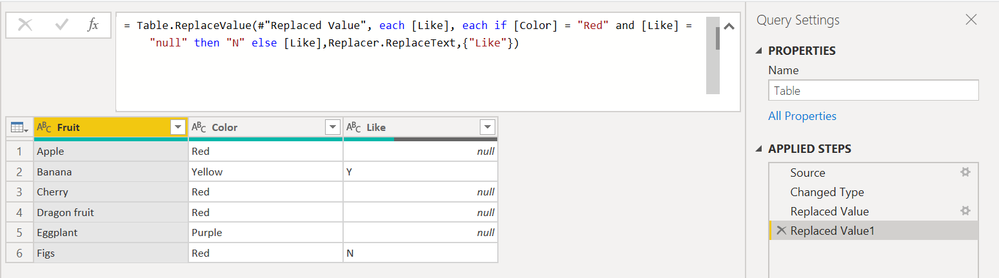
Yes I put the null in quotes in the "Replaced Value1" step in the following screenshot but it doesn't help.
- Mark as New
- Bookmark
- Subscribe
- Mute
- Subscribe to RSS Feed
- Permalink
- Report Inappropriate Content
..and the M-language is case sensitive, so you have to adjust to this:
Table.ReplaceValue(#"Changed Type", each [Like], each if [Color] = "Red" and [Like] = "null" then "N" else [Like],Replacer.ReplaceText,{"Like"})Imke Feldmann (The BIccountant)
If you liked my solution, please give it a thumbs up. And if I did answer your question, please mark this post as a solution. Thanks!
How to integrate M-code into your solution -- How to get your questions answered quickly -- How to provide sample data -- Check out more PBI- learning resources here -- Performance Tipps for M-queries
- Mark as New
- Bookmark
- Subscribe
- Mute
- Subscribe to RSS Feed
- Permalink
- Report Inappropriate Content
Tried lower case Like but no luck
- Mark as New
- Bookmark
- Subscribe
- Mute
- Subscribe to RSS Feed
- Permalink
- Report Inappropriate Content
Hi @lf963 ,
your null does look like simple text and not the "real" null. So this would probably work:
Table.ReplaceValue(#"Changed Type", each [LIKE], each if [Color] = "Red" and [Like] = "null" then "N" else [Like],Replacer.ReplaceText,{"Like"})
Imke Feldmann (The BIccountant)
If you liked my solution, please give it a thumbs up. And if I did answer your question, please mark this post as a solution. Thanks!
How to integrate M-code into your solution -- How to get your questions answered quickly -- How to provide sample data -- Check out more PBI- learning resources here -- Performance Tipps for M-queries
- Mark as New
- Bookmark
- Subscribe
- Mute
- Subscribe to RSS Feed
- Permalink
- Report Inappropriate Content
Hello @ImkeF,
The screenshot shown in my original post was manually created. I should've made them real "null". The following screenshot is the correct one:

The following syntax doesn't work:
= Table.ReplaceValue(#"Replaced Value", each [Like], each if [Color] = "Red" and [Like] = null then "N" else [Like],Replacer.ReplaceText,{"Like"})
Helpful resources

Power BI Dataviz World Championships
Vote for your favorite vizzies from the Power BI World Championship submissions!

Join our Community Sticker Challenge 2026
If you love stickers, then you will definitely want to check out our Community Sticker Challenge!

Power BI Monthly Update - January 2026
Check out the January 2026 Power BI update to learn about new features.

FabCon Atlanta 2026
Join us at FabCon Atlanta, March 16-20, for the ultimate Fabric, Power BI, AI and SQL community-led event. Save $200 with code FABCOMM.


| User | Count |
|---|---|
| 16 | |
| 12 | |
| 9 | |
| 7 | |
| 6 |


