Join us at FabCon Atlanta from March 16 - 20, 2026, for the ultimate Fabric, Power BI, AI and SQL community-led event. Save $200 with code FABCOMM.
Register now!The Power BI Data Visualization World Championships is back! It's time to submit your entry. Live now!
Hey guys, I'm studying Power Query but I'm stuck
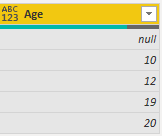
I have a column "Age" with some null values, I want to replace those with the average.
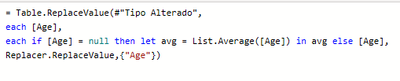
That's what I try to do:
I don't no what I'm doing wrong, someone can help me please?
Solved! Go to Solution.
Insert this statement
= Table.ReplaceValue(#"Tipo Alterado",each [Age],each if [Age] = null then List.Average(#"Changed Type"[Age]) else [Age],Replacer.ReplaceValue,{"Age"})
Insert this statement
= Table.ReplaceValue(#"Tipo Alterado",each [Age],each if [Age] = null then List.Average(#"Changed Type"[Age]) else [Age],Replacer.ReplaceValue,{"Age"})
That's a good solution! I would actually calculate the List.Average first, make us a variable, so it'll calculate only once. So
avg = List.Average(#"Changed Type"[Column])
The in the formula, just replace the text above with avg
--Nate
The Power BI Data Visualization World Championships is back! It's time to submit your entry.
| User | Count |
|---|---|
| 16 | |
| 9 | |
| 8 | |
| 7 | |
| 7 |