
cancel
Showing results for 
Search instead for 
Did you mean: 

Learn from the best! Meet the four finalists headed to the FINALS of the Power BI Dataviz World Championships! Register now

Reply
gsamaral77
Helper I
Helper I

Replace null values with average using Power Query

Hey guys, I'm studying Power Query but I'm stuck


I have a column "Age" with some null values, I want to replace those with the average. 


gsamaral77_0-1652526449539.png


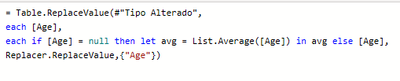
That's what I try to do:


gsamaral77_1-1652526484341.png

I don't no what I'm doing wrong, someone can help me please?


1 ACCEPTED SOLUTION
Vijay_A_Verma
Most Valuable Professional

Insert this statement

= Table.ReplaceValue(#"Tipo Alterado",each [Age],each if [Age] = null then List.Average(#"Changed Type"[Age]) else [Age],Replacer.ReplaceValue,{"Age"})

View solution in original post

2 REPLIES 2
Vijay_A_Verma
Most Valuable Professional

Insert this statement

= Table.ReplaceValue(#"Tipo Alterado",each [Age],each if [Age] = null then List.Average(#"Changed Type"[Age]) else [Age],Replacer.ReplaceValue,{"Age"})
Anonymous
Not applicable

That's a good solution! I would actually calculate the List.Average first, make us a variable, so it'll calculate only once. So

avg = List.Average(#"Changed Type"[Column])


The in the formula, just replace the text above with avg


--Nate


Helpful resources

Announcements
Join our Fabric User Panel

Join our Fabric User Panel

Share feedback directly with Fabric product managers, participate in targeted research studies and influence the Fabric roadmap.

March Power BI Update Carousel

Power BI Community Update - March 2026

Check out the March 2026 Power BI update to learn about new features.

Top Solution Authors