FabCon is coming to Atlanta
Join us at FabCon Atlanta from March 16 - 20, 2026, for the ultimate Fabric, Power BI, AI and SQL community-led event. Save $200 with code FABCOMM.
Register now!- Power BI forums
- Get Help with Power BI
- Desktop
- Service
- Report Server
- Power Query
- Mobile Apps
- Developer
- DAX Commands and Tips
- Custom Visuals Development Discussion
- Health and Life Sciences
- Power BI Spanish forums
- Translated Spanish Desktop
- Training and Consulting
- Instructor Led Training
- Dashboard in a Day for Women, by Women
- Galleries
- Data Stories Gallery
- Themes Gallery
- Contests Gallery
- QuickViz Gallery
- Quick Measures Gallery
- Visual Calculations Gallery
- Notebook Gallery
- Translytical Task Flow Gallery
- TMDL Gallery
- R Script Showcase
- Webinars and Video Gallery
- Ideas
- Custom Visuals Ideas (read-only)
- Issues
- Issues
- Events
- Upcoming Events
The Power BI Data Visualization World Championships is back! Get ahead of the game and start preparing now! Learn more
- Power BI forums
- Forums
- Get Help with Power BI
- Power Query
- Re: Replace non blanks with 1
- Subscribe to RSS Feed
- Mark Topic as New
- Mark Topic as Read
- Float this Topic for Current User
- Bookmark
- Subscribe
- Printer Friendly Page


- Mark as New
- Bookmark
- Subscribe
- Mute
- Subscribe to RSS Feed
- Permalink
- Report Inappropriate Content
Replace non blanks with 1
All,
In Power Query, How do I replace all non blanks with 1
I have tried the Excel Find and Replace method of * to 1
However this does not seem to work in Power BI
Solved! Go to Solution.


- Mark as New
- Bookmark
- Subscribe
- Mute
- Subscribe to RSS Feed
- Permalink
- Report Inappropriate Content
Hi @hdhillon , try this:
let
    Source = Table.FromRows(Json.Document(Binary.Decompress(Binary.FromText("i45WSi/KLy1QMFTSUQJhUwOlWB10QUMDrKLmpmiiRljVGuMUNUIRNYKai2KsEZoTgEwQAjETi1PSYNxYAA==", BinaryEncoding.Base64), Compression.Deflate)), let _t = ((type nullable text) meta [Serialized.Text = true]) in type table [Group = _t, Month = _t, Value = _t]),
    #"Changed Type" = Table.TransformColumnTypes(Source,{{"Value", Int64.Type}, {"Month", Int64.Type}}),
    #"Replaced Value" =
        Table.ReplaceValue(
            #"Changed Type",
            each [Group],
            each
                let
                    varReplacementValue = if Text.Length([Group]) > 0 then "1" else [Group]
                in
            varReplacementValue,
            Replacer.ReplaceText,
            {"Group"}
        )
in
    #"Replaced Value"
It turns this:
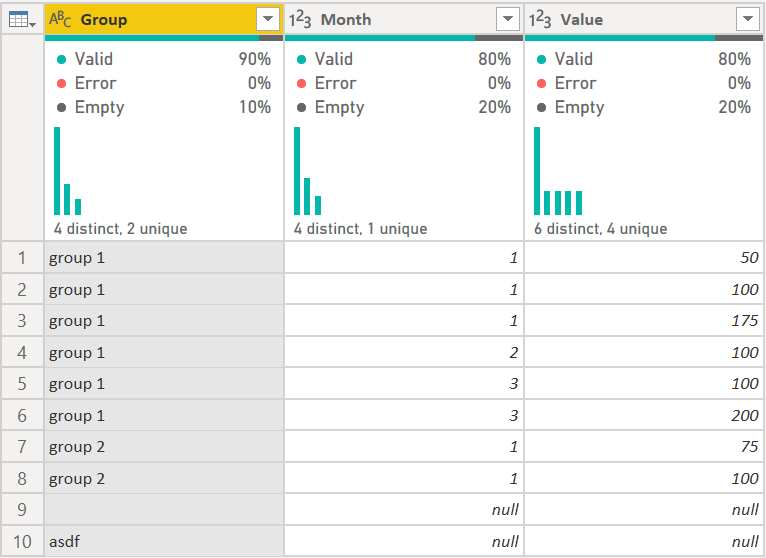
Into this:
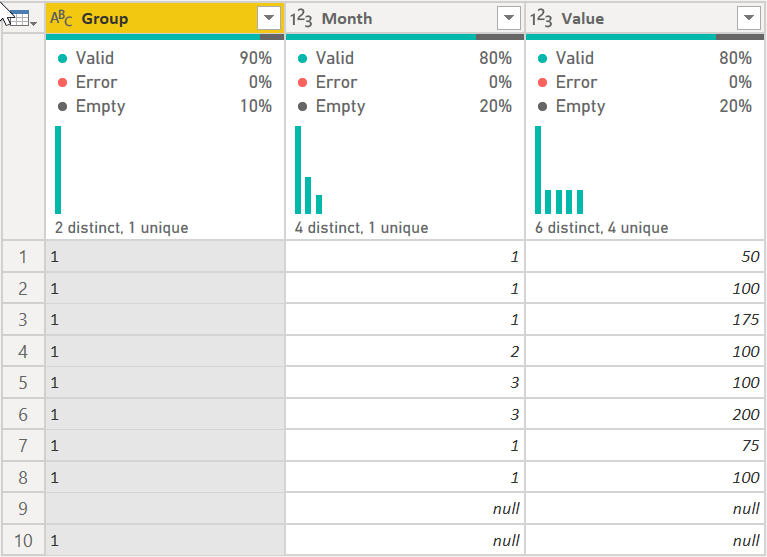
It looks for any field that has a length greater than 0 and replaces that field with "1" if it does.
How to use M code provided in a blank query:
1) In Power Query, select New Source, then Blank Query
2) On the Home ribbon, select "Advanced Editor" button
3) Remove everything you see, then paste the M code I've given you in that box.
4) Press Done
5) See this article if you need help using this M code in your model.
Did I answer your question? Mark my post as a solution!
Did my answers help arrive at a solution? Give it a kudos by clicking the Thumbs Up!
DAX is for Analysis. Power Query is for Data Modeling
Proud to be a Super User!
MCSA: BI Reporting
- Mark as New
- Bookmark
- Subscribe
- Mute
- Subscribe to RSS Feed
- Permalink
- Report Inappropriate Content
I had this issue as well where I wanted to replace dates with 1 and leave null values. I converted the dates to whole numbers then I added a custom column and divided the whole number by itself giving a 1 for the date values and null for null values.

- Mark as New
- Bookmark
- Subscribe
- Mute
- Subscribe to RSS Feed
- Permalink
- Report Inappropriate Content
Hi @Lon7171, you could do something like this:
Before

After

let
    Source = Table.FromRows(Json.Document(Binary.Decompress(Binary.FromText("i45WMjIwMtE1MAQipVgdJK4RKtcYzEUQcAkzpdhYAA==", BinaryEncoding.Base64), Compression.Deflate)), let _t = ((type nullable text) meta [Serialized.Text = true]) in type table [Date = _t]),
    ChangedType = Table.TransformColumnTypes(Source,{{"Date", type date}}),
    ReplacedDate = Table.TransformColumns(ChangedType, {{"Date", each if _ <> null then 1 else null, Int64.Type}})
in
    ReplacedDate
- Mark as New
- Bookmark
- Subscribe
- Mute
- Subscribe to RSS Feed
- Permalink
- Report Inappropriate Content
Powerquery
= IFERROR(IF(LEN(related(column_name))>0,"Y","-"),"-")
- Mark as New
- Bookmark
- Subscribe
- Mute
- Subscribe to RSS Feed
- Permalink
- Report Inappropriate Content
I know you said replace, but you could easily add a column like this:
Table.AddColumn(PriorStep, "NewColumnName", each if [Column] <> null then 1 else [Column], type number)

- Mark as New
- Bookmark
- Subscribe
- Mute
- Subscribe to RSS Feed
- Permalink
- Report Inappropriate Content
@hdhillon click the 
=Table.ReplaceValue(LastStepName,null,1,(x,y.z)=>if x=y or x="" then x else z,Table.ColumnNames(LastStepName))
LastStepName, is the last step name in your original M code
- Mark as New
- Bookmark
- Subscribe
- Mute
- Subscribe to RSS Feed
- Permalink
- Report Inappropriate Content
Hi @hdhillon , try this:
let
    Source = Table.FromRows(Json.Document(Binary.Decompress(Binary.FromText("i45WSi/KLy1QMFTSUQJhUwOlWB10QUMDrKLmpmiiRljVGuMUNUIRNYKai2KsEZoTgEwQAjETi1PSYNxYAA==", BinaryEncoding.Base64), Compression.Deflate)), let _t = ((type nullable text) meta [Serialized.Text = true]) in type table [Group = _t, Month = _t, Value = _t]),
    #"Changed Type" = Table.TransformColumnTypes(Source,{{"Value", Int64.Type}, {"Month", Int64.Type}}),
    #"Replaced Value" =
        Table.ReplaceValue(
            #"Changed Type",
            each [Group],
            each
                let
                    varReplacementValue = if Text.Length([Group]) > 0 then "1" else [Group]
                in
            varReplacementValue,
            Replacer.ReplaceText,
            {"Group"}
        )
in
    #"Replaced Value"
It turns this:
Into this:
It looks for any field that has a length greater than 0 and replaces that field with "1" if it does.
How to use M code provided in a blank query:
1) In Power Query, select New Source, then Blank Query
2) On the Home ribbon, select "Advanced Editor" button
3) Remove everything you see, then paste the M code I've given you in that box.
4) Press Done
5) See this article if you need help using this M code in your model.
Did I answer your question? Mark my post as a solution!
Did my answers help arrive at a solution? Give it a kudos by clicking the Thumbs Up!
DAX is for Analysis. Power Query is for Data Modeling
Proud to be a Super User!
MCSA: BI Reporting
Helpful resources

Power BI Monthly Update - November 2025
Check out the November 2025 Power BI update to learn about new features.

Fabric Data Days
Advance your Data & AI career with 50 days of live learning, contests, hands-on challenges, study groups & certifications and more!

FabCon Atlanta 2026
Join us at FabCon Atlanta, March 16-20, for the ultimate Fabric, Power BI, AI and SQL community-led event. Save $200 with code FABCOMM.

| User | Count |
|---|---|
| 11 | |
| 7 | |
| 5 | |
| 5 | |
| 3 |


