Join us at FabCon Atlanta from March 16 - 20, 2026, for the ultimate Fabric, Power BI, AI and SQL community-led event. Save $200 with code FABCOMM.
Register now!The Power BI Data Visualization World Championships is back! Get ahead of the game and start preparing now! Learn more
Hi there Power BI Community,
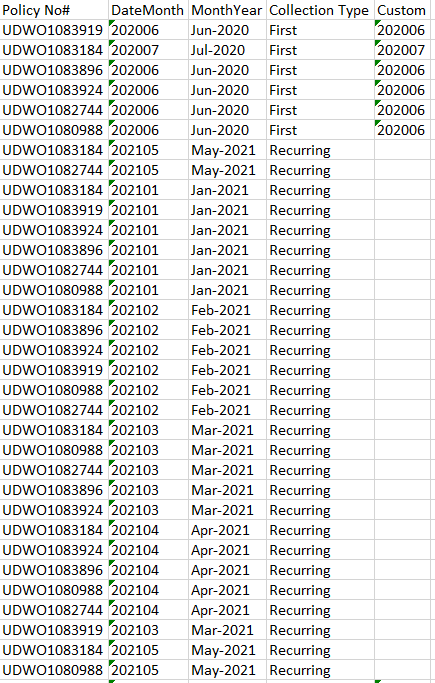
I have this data set and would like to repeat the [DateMonth] value of [CollectionType] = "First" where the [CollectionType] = "Recurring". I cannot use the fill-down function in this instance due to the layout of the data and am hoping to accomplish this in Power Query by adding a Custom Column.
My M code goes something along the lines of:
Lines 1 and Line 3 are fine. I need help to update line 2 please. so that the blanks in the custom column are replaced with the value of [DateMonth] that appears where Collection Type = "First"
if [Collection Type] = "First" then [DateMonth]
else if [Collection Type] = "Recurring" then insert the record of [DateMonth] that is equal to "First"
else null
Here is an example of the dataset:
Here is an example of what the data set should end up looking like:
Thanks in advance.
Solved! Go to Solution.
@BICrazy
Add the following custom column :
=
if [Collection Type] = "First" then
[DateMonth]
else if [Collection Type] = "Recurring" then
let
m = _[DateMonth],
p = _[#"Policy No#"]
in
Table.SelectRows(PreviousStep, each _[#"Policy No#"] = p and _[#"Collection Type"] = "First")[
DateMonth
]{0}
else
null
Replace the "PreviousStep" with the correct step name in your query
⭕ Subscribe and learn Power BI from these videos
⚪ Website ⚪ LinkedIn ⚪ PBI User Group
@BICrazy
Add the following custom column :
=
if [Collection Type] = "First" then
[DateMonth]
else if [Collection Type] = "Recurring" then
let
m = _[DateMonth],
p = _[#"Policy No#"]
in
Table.SelectRows(PreviousStep, each _[#"Policy No#"] = p and _[#"Collection Type"] = "First")[
DateMonth
]{0}
else
null
Replace the "PreviousStep" with the correct step name in your query
⭕ Subscribe and learn Power BI from these videos
⚪ Website ⚪ LinkedIn ⚪ PBI User Group
The Power BI Data Visualization World Championships is back! Get ahead of the game and start preparing now!
| User | Count |
|---|---|
| 16 | |
| 9 | |
| 8 | |
| 8 | |
| 7 |