cancel
Showing results for 
Search instead for 
Did you mean: 

We've captured the moments from FabCon & SQLCon that everyone is talking about, and we are bringing them to the community, live and on-demand. Starts on April 14th. Register now

Reply
BICrazy
Helper II
Helper II

Repeat same value in Power Query

Hi there Power BI Community,

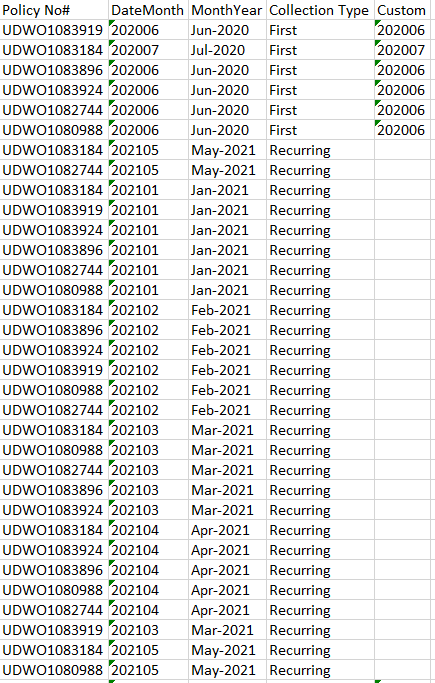
I have this data set and would like to repeat the [DateMonth] value of [CollectionType] = "First" where the [CollectionType] = "Recurring".   I cannot use the fill-down function in this instance due to the layout of the data and am hoping to accomplish this in Power Query by adding a Custom Column.

My M code goes something along the lines of:  
Lines 1 and Line 3 are fine.  I need help to update line 2 please. so that the blanks in the custom column are replaced with the value of [DateMonth] that appears where Collection Type  = "First"


if [Collection Type]  = "First" then [DateMonth] 
else if [Collection Type] = "Recurring" then insert the record of [DateMonth] that is equal to "First"
else null


Here is an example of the dataset:
image.png
Here is an example of what the data set should end up looking like:
image.png
Thanks in advance.

1 ACCEPTED SOLUTION
Fowmy
Super User
Super User

@BICrazy 

Add the following custom column : 


=
if [Collection Type] = "First" then
  [DateMonth]
else if [Collection Type] = "Recurring" then
  let
    m = _[DateMonth],
    p = _[#"Policy No#"]
  in
    Table.SelectRows(PreviousStep, each _[#"Policy No#"] = p and _[#"Collection Type"] = "First")[
      DateMonth
    ]{0}
else
  null


 Replace the "PreviousStep" with the correct step name in your query 

Did I answer your question? Mark my post as a solution! and hit thumbs up


Subscribe and learn Power BI from these videos

Website LinkedIn PBI User Group

View solution in original post

2 REPLIES 2
Fowmy
Super User
Super User

@BICrazy 

Add the following custom column : 


=
if [Collection Type] = "First" then
  [DateMonth]
else if [Collection Type] = "Recurring" then
  let
    m = _[DateMonth],
    p = _[#"Policy No#"]
  in
    Table.SelectRows(PreviousStep, each _[#"Policy No#"] = p and _[#"Collection Type"] = "First")[
      DateMonth
    ]{0}
else
  null


 Replace the "PreviousStep" with the correct step name in your query 

Did I answer your question? Mark my post as a solution! and hit thumbs up


Subscribe and learn Power BI from these videos

Website LinkedIn PBI User Group

Hi @Fowmy ,


This is awesome, it worked perfectly! Thanks a mill

Helpful resources

Announcements
New to Fabric survey Carousel

New to Fabric Survey

If you have recently started exploring Fabric, we'd love to hear how it's going. Your feedback can help with product improvements.

Power BI DataViz World Championships carousel

Power BI DataViz World Championships - June 2026

A new Power BI DataViz World Championship is coming this June! Don't miss out on submitting your entry.

Join our Fabric User Panel

Join our Fabric User Panel

Share feedback directly with Fabric product managers, participate in targeted research studies and influence the Fabric roadmap.