Don't miss your chance to take the Fabric Data Engineer (DP-600) exam for FREE! Find out how by watching the DP-600 session on-demand now through April 28th.
Learn moreJoin the FabCon + SQLCon recap series. Up next: Power BI, Real-Time Intelligence, IQ and AI, and Data Factory take center stage. All sessions are available on-demand after the live show. Register now
I have a two column table. One of the columns has Employee Id and the other has a list of all the benefits that the employee holds. I want to split by delimiter, a comma, but have the columns sort by the benefit type as well. Here is what the data looks like
| Employee ID | Benefits |
| 01 | Benefit 1/Family Plan, Benefit 2/Employee Plan,....,....,...,Benefit 7 |
| 02 | Benefit 1/Employee Plan, Benefit 3, Benefit 7 |
When I seperate by delimeter I get
| Employee ID | Benefits | Benefits_1 | Benefits_2 | Benefits_3 |
| 01 | Benefit 1/Family Plan | Benefit 2/Employee Plan | ... | ... |
| 02 | Benefit 1/Employee Plan | Benefit 3 | Benefit 7 |
I would like to end with this table:
| Employee ID | Benefits | Benefits_1 | Benefits_2 | Benefits_3 |
| 01 | Benefit 1/Family Plan | Benefit 2/Employee Plan | ... | ... |
| 02 | Benefit 1/Employee Plan | Benefit 3 |
This way all of the smae type plans are in one column together and a blank field shows up if that employee does not have that plan.
Solved! Go to Solution.
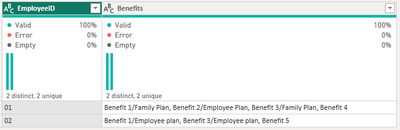
I made a simplified dataset.
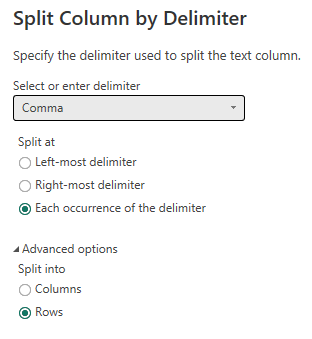
First, split the Benefits column by comma delimiter into rows
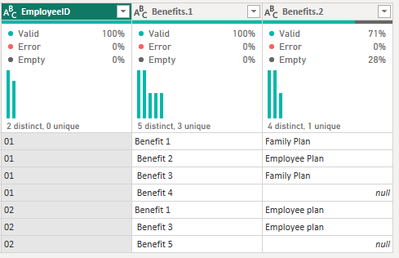
Split the resulting Benefits column into columns by forward slash delimiter to get...
I trimmed Benefits.1 and also replaced the null values in Benefits.2 with 'Has'
Then Pivot Column Benefits.1 using values from Benefits.2 without aggregating
To end up with...
Hope this gets you pointed in the right direction.
Proud to be a Super User! | |
I made a simplified dataset.
First, split the Benefits column by comma delimiter into rows
Split the resulting Benefits column into columns by forward slash delimiter to get...
I trimmed Benefits.1 and also replaced the null values in Benefits.2 with 'Has'
Then Pivot Column Benefits.1 using values from Benefits.2 without aggregating
To end up with...
Hope this gets you pointed in the right direction.
Proud to be a Super User! | |
Check out the April 2026 Power BI update to learn about new features.
If you have recently started exploring Fabric, we'd love to hear how it's going. Your feedback can help with product improvements.
A new Power BI DataViz World Championship is coming this June! Don't miss out on submitting your entry.
| User | Count |
|---|---|
| 3 | |
| 3 | |
| 2 | |
| 2 | |
| 2 |
| User | Count |
|---|---|
| 5 | |
| 4 | |
| 4 | |
| 4 | |
| 4 |