cancel
Showing results for 
Search instead for 
Did you mean: 

The Power BI Data Visualization World Championships is back! Get ahead of the game and start preparing now! Learn more

Reply
Anonymous
Not applicable

Reorder column values

I have a two column table. One of the columns has Employee Id and the other has a list of all the benefits that the employee holds. I want to split by delimiter, a comma, but have the columns sort by the benefit type as well. Here is what the data looks like

Employee IDBenefits
01Benefit 1/Family Plan, Benefit 2/Employee Plan,....,....,...,Benefit 7
02Benefit 1/Employee Plan, Benefit 3, Benefit 7


When I seperate by delimeter I get

Employee IDBenefitsBenefits_1Benefits_2Benefits_3
01Benefit 1/Family PlanBenefit 2/Employee Plan......
02Benefit 1/Employee PlanBenefit 3Benefit 7 


I would like to end with this table:

Employee IDBenefitsBenefits_1Benefits_2Benefits_3
01Benefit 1/Family PlanBenefit 2/Employee Plan......
02Benefit 1/Employee Plan Benefit 3 


This way all of the smae type plans are in one column together and a blank field shows up if that employee does not have that plan.

1 ACCEPTED SOLUTION
jgeddes
Super User
Super User

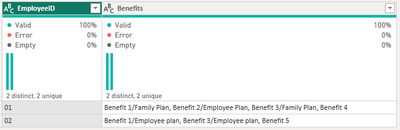
I made a simplified dataset.

jgeddes_0-1685039756010.png

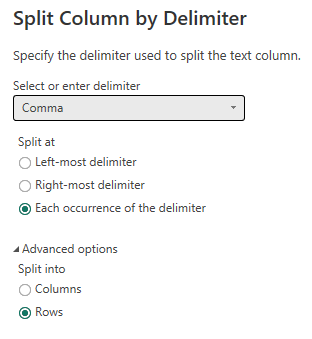
First, split the Benefits column by comma delimiter into rows

jgeddes_1-1685039872143.png

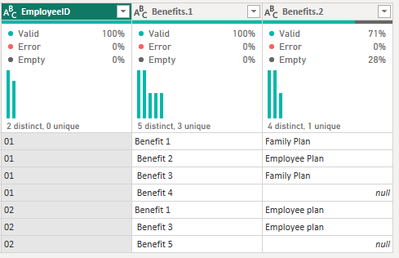
Split the resulting Benefits column into columns by forward slash delimiter to get...

jgeddes_2-1685039959219.png

I trimmed Benefits.1 and also replaced the null values in Benefits.2 with 'Has'

Then Pivot Column Benefits.1 using values from Benefits.2 without aggregating

jgeddes_3-1685040059149.png

To end up with...

jgeddes_4-1685040080471.png

Hope this gets you pointed in the right direction.


Did I answer your question? Mark my post as a solution!

Proud to be a Super User!


View solution in original post

1 REPLY 1
jgeddes
Super User
Super User

I made a simplified dataset.

jgeddes_0-1685039756010.png

First, split the Benefits column by comma delimiter into rows

jgeddes_1-1685039872143.png

Split the resulting Benefits column into columns by forward slash delimiter to get...

jgeddes_2-1685039959219.png

I trimmed Benefits.1 and also replaced the null values in Benefits.2 with 'Has'

Then Pivot Column Benefits.1 using values from Benefits.2 without aggregating

jgeddes_3-1685040059149.png

To end up with...

jgeddes_4-1685040080471.png

Hope this gets you pointed in the right direction.


Did I answer your question? Mark my post as a solution!

Proud to be a Super User!


Helpful resources

Announcements
Power BI DataViz World Championships

Power BI Dataviz World Championships

The Power BI Data Visualization World Championships is back! Get ahead of the game and start preparing now!

December 2025 Power BI Update Carousel

Power BI Monthly Update - December 2025

Check out the December 2025 Power BI Holiday Recap!

FabCon Atlanta 2026 carousel

FabCon Atlanta 2026

Join us at FabCon Atlanta, March 16-20, for the ultimate Fabric, Power BI, AI and SQL community-led event. Save $200 with code FABCOMM.