Don't miss your chance to take exam DP-600 or DP-700 on us!
Request nowLearn from the best! Meet the four finalists headed to the FINALS of the Power BI Dataviz World Championships! Register now
Hello,
I need help filtering out duplicates based on multiple columns.
Sample dataset :
| PO | Decision | Amount | Createdon |
| A | Repair | 500 | 1/1/2021 |
| A | Repair | 500 | 20/5/2021 |
| A | Test | 500 | 30/12/2021 |
| B | Repair | 500 | 23/10/2020 |
| B | Repair | 1200 | 1/7/2021 |
| B | Repair | 600 | 25/07/2021 |
| C | Test | 800 | 1/10/2021 |
| D | Repair | 1000 | 16/7/2021 |
| D | Repair | 1000 | 16/10/2021 |
Expected Result:
| A | Test | 500 | 30/12/2021 |
| B | Repair | 600 | 25/07/2021 |
| C | Test | 800 | 1/10/2021 |
| D | Repair | 1000 | 16/7/2021 |
Rules:
1. If decision and Amount for occurrences of a PO is same, keep the occurrence with the earliest 'createdon' --> Example : PO D
2. If either of decision or amount for multiple POs is changing, keep the occurrence with the latest 'createdon' --> Example : PO A and B
3. Keep all single occurrences of a PO --> Example : PO C
I would highly appreciate your help. Alternatively, a solution in DAX to mark the relevant rows also works.
Thank you.
Solved! Go to Solution.
You can do this in two steps. First, group by PO, Decision, Amount taking the minimum over Createdon. Then group by just PO taking the maximum over Createdon using one of the methods I describe in this blog post:
Select Distinct Rows Ordered by Another Column -- Power Query Edition
Here's an example query with both steps:
let
Source = Table.FromRows(Json.Document(Binary.Decompress(Binary.FromText("i45WclTSUQpKLUjMLAIyTA0MgKShvqG+kYGRoVKsDlZ5IwN9U1QFIanFJXBpYwN9QyOEvBMWA4z1DQ1AKgwwVRgaQd1gjsMIM4gRpvoGSCqcEY6wgPnBACHtgmKDAUSFGbIVOFTADYkFAA==", BinaryEncoding.Base64), Compression.Deflate)), let _t = ((type nullable text) meta [Serialized.Text = true]) in type table [PO = _t, Decision = _t, Amount = _t, Createdon = _t]),
#"Changed Type" = Table.TransformColumnTypes(Source,{{"PO", type text}, {"Decision", type text}, {"Amount", Int64.Type}, {"Createdon", type date}}, "en-IN"),
#"Grouped Rows" = Table.Group(#"Changed Type", {"PO", "Decision", "Amount"}, {{"Createdon", each List.Min([Createdon]), type nullable date}}),
#"Grouped Rows1" = Table.Group(#"Grouped Rows", {"PO"}, {{"MaxDate", each Table.Max(_, "Createdon"), type record}}),
#"Expanded MaxDate" = Table.ExpandRecordColumn(#"Grouped Rows1", "MaxDate", {"Decision", "Amount", "Createdon"}, {"Decision", "Amount", "Createdon"}),
#"Changed Type1" = Table.TransformColumnTypes(#"Expanded MaxDate",{{"Decision", type text}, {"Amount", Int64.Type}, {"Createdon", type date}})
in
#"Changed Type1"
You can do this in two steps. First, group by PO, Decision, Amount taking the minimum over Createdon. Then group by just PO taking the maximum over Createdon using one of the methods I describe in this blog post:
Select Distinct Rows Ordered by Another Column -- Power Query Edition
Here's an example query with both steps:
let
Source = Table.FromRows(Json.Document(Binary.Decompress(Binary.FromText("i45WclTSUQpKLUjMLAIyTA0MgKShvqG+kYGRoVKsDlZ5IwN9U1QFIanFJXBpYwN9QyOEvBMWA4z1DQ1AKgwwVRgaQd1gjsMIM4gRpvoGSCqcEY6wgPnBACHtgmKDAUSFGbIVOFTADYkFAA==", BinaryEncoding.Base64), Compression.Deflate)), let _t = ((type nullable text) meta [Serialized.Text = true]) in type table [PO = _t, Decision = _t, Amount = _t, Createdon = _t]),
#"Changed Type" = Table.TransformColumnTypes(Source,{{"PO", type text}, {"Decision", type text}, {"Amount", Int64.Type}, {"Createdon", type date}}, "en-IN"),
#"Grouped Rows" = Table.Group(#"Changed Type", {"PO", "Decision", "Amount"}, {{"Createdon", each List.Min([Createdon]), type nullable date}}),
#"Grouped Rows1" = Table.Group(#"Grouped Rows", {"PO"}, {{"MaxDate", each Table.Max(_, "Createdon"), type record}}),
#"Expanded MaxDate" = Table.ExpandRecordColumn(#"Grouped Rows1", "MaxDate", {"Decision", "Amount", "Createdon"}, {"Decision", "Amount", "Createdon"}),
#"Changed Type1" = Table.TransformColumnTypes(#"Expanded MaxDate",{{"Decision", type text}, {"Amount", Int64.Type}, {"Createdon", type date}})
in
#"Changed Type1"
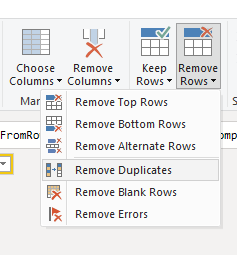
Hi @Zabeer. The Remove Duplicate rows feature in Power Query also works across multiple columns. You just need to select the columns that need to be distinct. For example, choosing "PO" and "Decision" or choosing, "PO", "Decision" and "Date".
Please note that Power Query will keep the First Distinct result instead of Group By. If you want to control the selection of the first Distinct, you will need to apply a Sort in the previous step.
Share feedback directly with Fabric product managers, participate in targeted research studies and influence the Fabric roadmap.
Check out the February 2026 Power BI update to learn about new features.
| User | Count |
|---|---|
| 9 | |
| 9 | |
| 9 | |
| 8 | |
| 6 |