cancel
Showing results for 
Search instead for 
Did you mean: 

July 28 - August 9 | Final Round of the Power BI Dataviz World Championships. This is your chance. Learn more

Reply
Zabeer
Helper I
Helper I

Remove duplicates based on multiple columns

Hello,

I need help filtering out duplicates based on multiple columns.
Sample dataset :

PODecisionAmountCreatedon
ARepair5001/1/2021
ARepair50020/5/2021
ATest50030/12/2021
BRepair50023/10/2020
BRepair12001/7/2021
BRepair60025/07/2021
CTest8001/10/2021
DRepair100016/7/2021
DRepair100016/10/2021


Expected Result:

ATest50030/12/2021
BRepair60025/07/2021
CTest8001/10/2021
DRepair100016/7/2021


Rules:
1. If decision and Amount for occurrences of a PO is same, keep the occurrence with the earliest 'createdon' --> Example : PO D
2. If either of decision or amount for multiple POs is changing, keep the occurrence with the latest 'createdon' --> Example : PO A and B
3. Keep all single occurrences of a PO --> Example : PO C

I would highly appreciate your help. Alternatively, a solution in DAX to mark the relevant rows also works.

Thank you.

1 ACCEPTED SOLUTION
AlexisOlson
Super User
Super User

You can do this in two steps. First, group by PO, Decision, Amount taking the minimum over Createdon. Then group by just PO taking the maximum over Createdon using one of the methods I describe in this blog post:

Select Distinct Rows Ordered by Another Column -- Power Query Edition


Here's an example query with both steps:

let
    Source = Table.FromRows(Json.Document(Binary.Decompress(Binary.FromText("i45WclTSUQpKLUjMLAIyTA0MgKShvqG+kYGRoVKsDlZ5IwN9U1QFIanFJXBpYwN9QyOEvBMWA4z1DQ1AKgwwVRgaQd1gjsMIM4gRpvoGSCqcEY6wgPnBACHtgmKDAUSFGbIVOFTADYkFAA==", BinaryEncoding.Base64), Compression.Deflate)), let _t = ((type nullable text) meta [Serialized.Text = true]) in type table [PO = _t, Decision = _t, Amount = _t, Createdon = _t]),
    #"Changed Type" = Table.TransformColumnTypes(Source,{{"PO", type text}, {"Decision", type text}, {"Amount", Int64.Type}, {"Createdon", type date}}, "en-IN"),
    #"Grouped Rows" = Table.Group(#"Changed Type", {"PO", "Decision", "Amount"}, {{"Createdon", each List.Min([Createdon]), type nullable date}}),
    #"Grouped Rows1" = Table.Group(#"Grouped Rows", {"PO"}, {{"MaxDate", each Table.Max(_, "Createdon"), type record}}),
    #"Expanded MaxDate" = Table.ExpandRecordColumn(#"Grouped Rows1", "MaxDate", {"Decision", "Amount", "Createdon"}, {"Decision", "Amount", "Createdon"}),
    #"Changed Type1" = Table.TransformColumnTypes(#"Expanded MaxDate",{{"Decision", type text}, {"Amount", Int64.Type}, {"Createdon", type date}})
in
    #"Changed Type1"

View solution in original post

2 REPLIES 2
AlexisOlson
Super User
Super User

You can do this in two steps. First, group by PO, Decision, Amount taking the minimum over Createdon. Then group by just PO taking the maximum over Createdon using one of the methods I describe in this blog post:

Select Distinct Rows Ordered by Another Column -- Power Query Edition


Here's an example query with both steps:

let
    Source = Table.FromRows(Json.Document(Binary.Decompress(Binary.FromText("i45WclTSUQpKLUjMLAIyTA0MgKShvqG+kYGRoVKsDlZ5IwN9U1QFIanFJXBpYwN9QyOEvBMWA4z1DQ1AKgwwVRgaQd1gjsMIM4gRpvoGSCqcEY6wgPnBACHtgmKDAUSFGbIVOFTADYkFAA==", BinaryEncoding.Base64), Compression.Deflate)), let _t = ((type nullable text) meta [Serialized.Text = true]) in type table [PO = _t, Decision = _t, Amount = _t, Createdon = _t]),
    #"Changed Type" = Table.TransformColumnTypes(Source,{{"PO", type text}, {"Decision", type text}, {"Amount", Int64.Type}, {"Createdon", type date}}, "en-IN"),
    #"Grouped Rows" = Table.Group(#"Changed Type", {"PO", "Decision", "Amount"}, {{"Createdon", each List.Min([Createdon]), type nullable date}}),
    #"Grouped Rows1" = Table.Group(#"Grouped Rows", {"PO"}, {{"MaxDate", each Table.Max(_, "Createdon"), type record}}),
    #"Expanded MaxDate" = Table.ExpandRecordColumn(#"Grouped Rows1", "MaxDate", {"Decision", "Amount", "Createdon"}, {"Decision", "Amount", "Createdon"}),
    #"Changed Type1" = Table.TransformColumnTypes(#"Expanded MaxDate",{{"Decision", type text}, {"Amount", Int64.Type}, {"Createdon", type date}})
in
    #"Changed Type1"
Anonymous
Not applicable

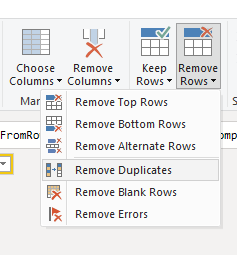
Hi @Zabeer.  The Remove Duplicate rows feature in Power Query also works across multiple columns.   You just need to select the columns that need to be distinct.  For example, choosing "PO" and "Decision" or choosing, "PO", "Decision" and "Date".  

Please note that Power Query will keep the First Distinct result instead of Group By.  If you want to control the selection of the first Distinct, you will need to apply a Sort in the previous step. 

DarylLynchBzy_0-1642762814178.png


Helpful resources

Announcements
FabCon and SQLCon Barcelona 2026

FabCon & SQLCon – Barcelona 2026

Join us in Barcelona for FabCon and SQLCon, the Fabric, Power BI, SQL, and AI community event. Save €200 with code FABCMTY200.

Fabric Community Sticker Design Challenge Barcelona Carousel

Fabric Community Sticker Challenge - Barcelona 2026

If you love stickers, then you will definitely want to check out our community sticker challenge, Barcelona edition!

July Power BI Update Carousel

Power BI Monthly Update - July 2026

Check out the July 2026 Power BI update to learn about new features.

Power BI DataViz World Championships carousel

Power BI DataViz World Championships - June 2026

A new Power BI DataViz World Championship is coming this June! Don't miss out on submitting your entry.