
Get certified for free when you join Fabric Data Days 2026 and dive into Fabric, Power BI, SQL, AI, and other essential data skills.
Join nowJuly 7 - July 17 | Round 2 of the Power BI Dataviz World Championships. Don't miss your chance! Learn more
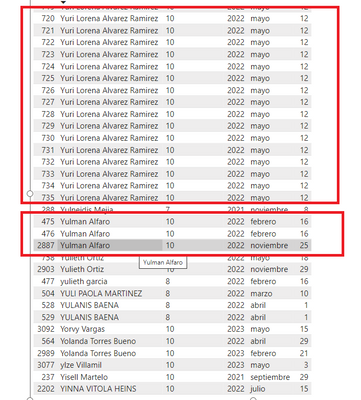
Hello. I need to remove duplicates "name" by date.
In the first case (Yuri Lorena), I need to keep just a row for 2022 -mayo-12.
In the second case (Yulman...), I need to keep the rows 2022-mayo-12 and 2022-noviembre-25
Thanks in advance
Solved! Go to Solution.
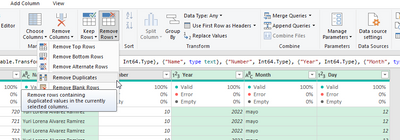
Good day ebersolorzano. The function you need is available from Power Query's UI, via the "Remove Rows" button. Select the columns which are to be considered for duplication. Click "Remove Rows" and from the sub-menu which pops up click "Remove Duplicates".
The Power Query documentation on removing duplicates is here and the "BI Gorilla" has a complete guide here.
I reproduced your data, brought it into Power Query...
and then applied the solution to give...
The M code is...
= Table.Distinct(#"Name of Previous Step", {"Name", "Year", "Month", "Day"})...the columns being considered in the duplication are listed between the curly brackets.
Good day ebersolorzano. The function you need is available from Power Query's UI, via the "Remove Rows" button. Select the columns which are to be considered for duplication. Click "Remove Rows" and from the sub-menu which pops up click "Remove Duplicates".
The Power Query documentation on removing duplicates is here and the "BI Gorilla" has a complete guide here.
I reproduced your data, brought it into Power Query...
and then applied the solution to give...
The M code is...
= Table.Distinct(#"Name of Previous Step", {"Name", "Year", "Month", "Day"})...the columns being considered in the duplication are listed between the curly brackets.
Thanks a lot. It works.
Thanks. The issue was solved.
Join us in Barcelona for FabCon and SQLCon, the Fabric, Power BI, SQL, and AI community event. Save €200 with code FABCMTY200.
Join Fabric Data Days 2026: 60 days of free live/on-demand sessions, challenges, study groups, and certification opportunities.