This is best Fabric, Power BI, SQL and AI community event. How do we know? The last event sold out! Save €200 with code FABCMTY200.
Register nowA new Data Days event is coming soon! This time we’re going bigger than ever. Fabric, Power BI, SQL, AI and more. Don't miss out.
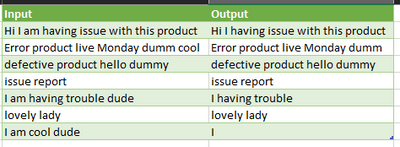
remove certain strings from the column
| Input | Input | output |
| Hi I am having issue with this product | am | Hi I having issue with this product |
| Error product live Monday dumm cool | cool | Error product live Monday dumm |
| defective product hello dummy | dude | defective product hello dummy |
| issue report | issue report | |
| I am having trouble dude | I having trouble | |
| lovely lady | lovely lady | |
| I am cool dude | I |
Solved! Go to Solution.
You can leverage the List.ReplaceMatchingItems function with Table.AddColumn.
Words to Remove
let
//Read in original data
Source = Excel.CurrentWorkbook(){[Name="InputData"]}[Content],
#"Changed Type" = Table.TransformColumnTypes(Source,{{"Input", type text}}),
//Read in list of words to remove
Source2 = Excel.CurrentWorkbook(){[Name="removeWords"]}[Content],
RemoveWords = Source2[Input],
//Add column with the words to remove replace by null
#"Remove Words" =
Table.AddColumn(#"Changed Type", "Output",
each Text.Combine(
List.ReplaceMatchingItems(
Text.Split([Input]," "),
List.Transform(RemoveWords, each {_, null})),
" "))
in
#"Remove Words"
Hi @Anonymous ,
Below is a different approach to @ronrsnfld.:
Outcome:
Code:
let
Source = Table.FromRows(Json.Document(Binary.Decompress(Binary.FromText("Xc7RCoMwDAXQX7n02d8YbA/7AvGhM5ktpEZi6+jfTzsE2VPg5lySvnf3iAd8QvBbnCfEdS2MT8wBOcQViymVMbvO+eSGrnc3M7UzhsSN8dSZfAWVlDCqyo7bODjxm8d8qLMSWEQbrjukQtzg77DxopaxL9DS62vZtLyE0SonEN1YKsRT/WsdL1zs8AU=", BinaryEncoding.Base64), Compression.Deflate)), let _t = ((type nullable text) meta [Serialized.Text = true]) in type table [Input = _t, Remove = _t]),
#"Changed Type" = Table.TransformColumnTypes(Source,{{"Input", type text}, {"Remove", type text}}),
//Remove certain string
#"Added Custom" = Table.AddColumn(
#"Changed Type",
"Output",
each
if [Remove]=" "
then [Input]
else Text.Replace(
Text.Replace(
[Input],
[Remove],
"")
,
" ",
" "
)
)
in
#"Added Custom"
Regards
KT
You can leverage the List.ReplaceMatchingItems function with Table.AddColumn.
Words to Remove
let
//Read in original data
Source = Excel.CurrentWorkbook(){[Name="InputData"]}[Content],
#"Changed Type" = Table.TransformColumnTypes(Source,{{"Input", type text}}),
//Read in list of words to remove
Source2 = Excel.CurrentWorkbook(){[Name="removeWords"]}[Content],
RemoveWords = Source2[Input],
//Add column with the words to remove replace by null
#"Remove Words" =
Table.AddColumn(#"Changed Type", "Output",
each Text.Combine(
List.ReplaceMatchingItems(
Text.Split([Input]," "),
List.Transform(RemoveWords, each {_, null})),
" "))
in
#"Remove Words"
Check out the May 2026 Power BI update to learn about new features.
Sign up to receive a private message when registration opens and key events begin.
If you have recently started exploring Fabric, we'd love to hear how it's going. Your feedback can help with product improvements.