cancel
Showing results for 
Search instead for 
Did you mean: 

Try your skills in the Power BI Dataviz World Championship! Round one ends June 26. Join now

Reply
Anonymous
Not applicable

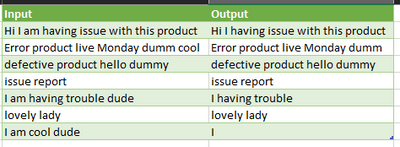
Remove certain words from text column using column2

remove certain strings from the column

InputInputoutput
Hi I am having issue with this productamHi I having issue with this product
Error product live Monday dumm coolcoolError product live Monday dumm 
defective product hello dummydudedefective product hello dummy
issue report  issue report 
I am having trouble dude I  having trouble 
lovely lady  lovely lady 
I am cool dude 
1 ACCEPTED SOLUTION
ronrsnfld
Super User
Super User

You can leverage the List.ReplaceMatchingItems function with Table.AddColumn.


Words to Remove

ronrsnfld_1-1660440693654.png

let

//Read in original data
    Source = Excel.CurrentWorkbook(){[Name="InputData"]}[Content],
    #"Changed Type" = Table.TransformColumnTypes(Source,{{"Input", type text}}),

//Read in list of words to remove
    Source2 = Excel.CurrentWorkbook(){[Name="removeWords"]}[Content],
    RemoveWords = Source2[Input],

//Add column with the words to remove replace by null
    #"Remove Words" = 
        Table.AddColumn(#"Changed Type", "Output", 
            each Text.Combine(
                    List.ReplaceMatchingItems(
                        Text.Split([Input]," "), 
                        List.Transform(RemoveWords, each {_, null})),
                 " "))
in
  #"Remove Words"

ronrsnfld_0-1660440657443.png


View solution in original post

2 REPLIES 2
KT_Bsmart2gethe
Impactful Individual

Hi @Anonymous ,


Below is a different approach to @ronrsnfld.:


Outcome:

KT_Bsmart2gethe_0-1660480096657.png


Code:

let
    Source = Table.FromRows(Json.Document(Binary.Decompress(Binary.FromText("Xc7RCoMwDAXQX7n02d8YbA/7AvGhM5ktpEZi6+jfTzsE2VPg5lySvnf3iAd8QvBbnCfEdS2MT8wBOcQViymVMbvO+eSGrnc3M7UzhsSN8dSZfAWVlDCqyo7bODjxm8d8qLMSWEQbrjukQtzg77DxopaxL9DS62vZtLyE0SonEN1YKsRT/WsdL1zs8AU=", BinaryEncoding.Base64), Compression.Deflate)), let _t = ((type nullable text) meta [Serialized.Text = true]) in type table [Input = _t, Remove = _t]),
    #"Changed Type" = Table.TransformColumnTypes(Source,{{"Input", type text}, {"Remove", type text}}),

    //Remove certain string
    #"Added Custom" = Table.AddColumn(
                        #"Changed Type", 
                        "Output", 
                        each 
                            if [Remove]=" " 
                            then [Input] 
                            else Text.Replace(
                                    Text.Replace(
                                        [Input],
                                        [Remove],
                                        "")
                                    , 
                                    "  ", 
                                    " "
                                )
                    )
in
    #"Added Custom"


Regards

KT

ronrsnfld
Super User
Super User

You can leverage the List.ReplaceMatchingItems function with Table.AddColumn.


Words to Remove

ronrsnfld_1-1660440693654.png

let

//Read in original data
    Source = Excel.CurrentWorkbook(){[Name="InputData"]}[Content],
    #"Changed Type" = Table.TransformColumnTypes(Source,{{"Input", type text}}),

//Read in list of words to remove
    Source2 = Excel.CurrentWorkbook(){[Name="removeWords"]}[Content],
    RemoveWords = Source2[Input],

//Add column with the words to remove replace by null
    #"Remove Words" = 
        Table.AddColumn(#"Changed Type", "Output", 
            each Text.Combine(
                    List.ReplaceMatchingItems(
                        Text.Split([Input]," "), 
                        List.Transform(RemoveWords, each {_, null})),
                 " "))
in
  #"Remove Words"

ronrsnfld_0-1660440657443.png


Helpful resources

Announcements
Fabric Data Days is here Carousel

Fabric Data Days 2026

Don't miss out on Data Days, June 15 through August 7. Learn Fabric, Power BI, SQL, AI and more.

Power BI DataViz World Championships carousel

Power BI DataViz World Championships - June 2026

A new Power BI DataViz World Championship is coming this June! Don't miss out on submitting your entry.