


cancel
Showing results for 
Search instead for 
Did you mean: 

The Power BI Data Visualization World Championships is back! Get ahead of the game and start preparing now! Learn more

Reply
Anonymous
Not applicable

Remove Duplicates Based on Another Column Value


Guys, I need your support please, I need to remove duplicates selecting 4 columns based on 5th column value condicationally:


The current script carries out removing the duplications of 4 selected columns:

= Table.Distinct(#"Divided Column", {"HR ID", "Employee Name", "Exception Duration", "Date"})


Now, how to set this in condition if "Exception Type" = "Daily"


1 ACCEPTED SOLUTION
Anonymous
Not applicable

@Anonymous 


You may check the steps in the pbix

Vpazhenmsft_0-1635919961026.png


Best regards
Paul Zheng _ Community Support Team
If this post helps, please Accept it as the solution to help the other members find it more quickly.

View solution in original post

5 REPLIES 5
Anonymous
Not applicable

@Anonymous 


You may check the steps in the pbix

Vpazhenmsft_0-1635919961026.png


Best regards
Paul Zheng _ Community Support Team
If this post helps, please Accept it as the solution to help the other members find it more quickly.

Fowmy
Super User
Super User

@Anonymous 

Can you share/paste some sample data and show the expected output from Excel to correctly understand your question.?


Did I answer your question? Mark my post as a solution! and hit thumbs up


Subscribe and learn Power BI from these videos

Website LinkedIn PBI User Group

Anonymous
Not applicable

Current dataset (2nd image)

Desired output (1st image)


Magdoulin_1-1635704113217.png

Magdoulin_0-1635704094122.png

I'm looking at your top image as the desired output.  It seems to include duplicates (lines 2 and 3) as well as an Exception type of Monthly.  I thought you wanted those removed? Can you clarify?

@Anonymous 

Do the following steps:

1. Duplicate your source query
2. Filter on one with Exception Type = Daily
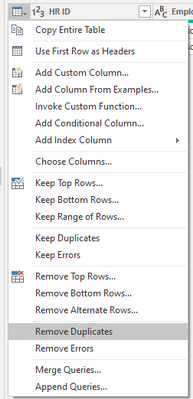
3. Apply Remove Duplicates on the table

Fowmy_0-1635705693069.png

4. On the other copy of the query, filter out daily
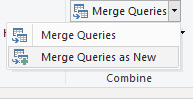
5. Append as New query

Fowmy_1-1635705757582.png


Did I answer your question? Mark my post as a solution! and hit thumbs up


Subscribe and learn Power BI from these videos

Website LinkedIn PBI User Group

Helpful resources

Announcements
Power BI DataViz World Championships

Power BI Dataviz World Championships

The Power BI Data Visualization World Championships is back! Get ahead of the game and start preparing now!

December 2025 Power BI Update Carousel

Power BI Monthly Update - December 2025

Check out the December 2025 Power BI Holiday Recap!

FabCon Atlanta 2026 carousel

FabCon Atlanta 2026

Join us at FabCon Atlanta, March 16-20, for the ultimate Fabric, Power BI, AI and SQL community-led event. Save $200 with code FABCOMM.