Get certified for free when you join Fabric Data Days 2026 and dive into Fabric, Power BI, SQL, AI, and other essential data skills.
Join nowData Days is here! Join us now for 60+ days of learning, challenges, and connection. Learn more
Hi folks,
For months now, I've been the only person who has been manually extracting data and placing it in our SharePoint folder. Anytime I'm asked to refresh data, I extract from tool, save in SharePoint folder under same name, then open Power Query and refresh. I've had no issues doing this.
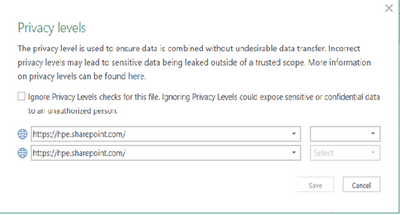
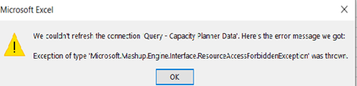
Recently, we onboarded a new team member who also wants to refresh this data. When he tries to do so, he gets errors regarding privacy levels/etc. Last time he tried, this window came up asking about the Privacy levels and he hit "Ignore Privacy Levels", but still has the same issue.
Here is the error that comes up on his end:
He has access to this folder in SharePoint. Does anyone have any suggestions?
Solved! Go to Solution.
@Anonymous , refer if these two can help
Thank you so much. This is great.
Don't miss out on Data Days, June 15 through August 7. Learn Fabric, Power BI, SQL, AI and more.
Check out the May 2026 Power BI update to learn about new features.
| User | Count |
|---|---|
| 4 | |
| 4 | |
| 2 | |
| 2 | |
| 1 |
| User | Count |
|---|---|
| 11 | |
| 11 | |
| 5 | |
| 4 | |
| 4 |