cancel
Showing results for 
Search instead for 
Did you mean: 

The Power BI Data Visualization World Championships is back! Get ahead of the game and start preparing now! Learn more

Reply
Anonymous
Not applicable

Refreshing Data on Power Query from SharePoint Error: How to fix?

Hi folks,


For months now, I've been the only person who has been manually extracting data and placing it in our SharePoint folder. Anytime I'm asked to refresh data, I extract from tool, save in SharePoint folder under same name, then open Power Query and refresh. I've had no issues doing this.


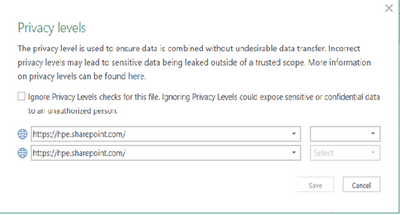
Recently, we onboarded a new team member who also wants to refresh this data. When he tries to do so, he gets errors regarding privacy levels/etc. Last time he tried, this window came up asking about the Privacy levels and he hit "Ignore Privacy Levels", but still has the same issue.


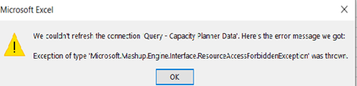
Here is the error that comes up on his end:


rzgazaryan_0-1618940519607.pngrzgazaryan_1-1618940595576.png


He has access to this folder in SharePoint. Does anyone have any suggestions?

1 ACCEPTED SOLUTION
2 REPLIES 2
Anonymous
Not applicable

Thank you so much. This is great.

Helpful resources

Announcements
November Power BI Update Carousel

Power BI Monthly Update - November 2025

Check out the November 2025 Power BI update to learn about new features.

Fabric Data Days Carousel

Fabric Data Days

Advance your Data & AI career with 50 days of live learning, contests, hands-on challenges, study groups & certifications and more!

FabCon Atlanta 2026 carousel

FabCon Atlanta 2026

Join us at FabCon Atlanta, March 16-20, for the ultimate Fabric, Power BI, AI and SQL community-led event. Save $200 with code FABCOMM.