cancel
Showing results for 
Search instead for 
Did you mean: 

The Power BI Data Visualization World Championships is back! Get ahead of the game and start preparing now! Learn more

Reply
qazwsxedc
Helper III
Helper III

Reference a date in another query

I have several sql queries that need to delare a date, e.g. Declare @date1 datetime ='31july2020'

Instead of changing the date for all the queries each month, I  want to link it to another query "Date" so that every month I only need to update the date in the "Date" query, then all other queries' date will be updated. Thanks!

1 ACCEPTED SOLUTION
v-xuding-msft
Community Support
Community Support

Hi @qazwsxedc ,


If you import data by T-SQL, you could reference this similar threads to use parameters change date.


https://community.powerbi.com/t5/Desktop/How-do-I-pass-parameters-to-my-SQL-statement/td-p/118716

https://community.powerbi.com/t5/Desktop/Declare-parameters-for-SQL-query-in-Power-BI/td-p/195620


Best Regards,
Xue Ding
If this post helps, then please consider Accept it as the solution to help the other members find it more quickly.

View solution in original post

5 REPLIES 5
v-xuding-msft
Community Support
Community Support

Hi @qazwsxedc ,


If you import data by T-SQL, you could reference this similar threads to use parameters change date.


https://community.powerbi.com/t5/Desktop/How-do-I-pass-parameters-to-my-SQL-statement/td-p/118716

https://community.powerbi.com/t5/Desktop/Declare-parameters-for-SQL-query-in-Power-BI/td-p/195620


Best Regards,
Xue Ding
If this post helps, then please consider Accept it as the solution to help the other members find it more quickly.

Thank you very mcuh. The links are useful!

Fowmy
Super User
Super User

@qazwsxedc 

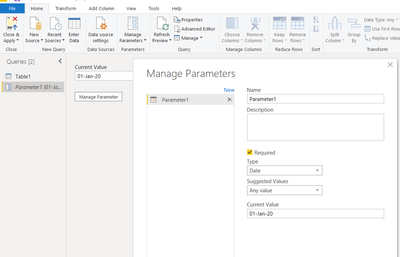
Create a Parameter in Power Query and refer that in all other queries. You can change the Parameter at any time.

Fowmy_0-1599247981893.png

________________________

If my answer was helpful, please consider Accept it as the solution to help the other members find it

Click on the Thumbs-Up icon if you like this reply 🙂

YouTube  LinkedIn


Did I answer your question? Mark my post as a solution! and hit thumbs up


Subscribe and learn Power BI from these videos

Website LinkedIn PBI User Group

Thanks! I have created the Parameter named "Date", but how to insert the parameter and repplace  the '31July2020' in "Declare @date1 datetime ='31july2020'"? 

@qazwsxedc 


I thought you wanted to replace the static date with a parameter in your Power Query query.  

It seems you wanted to do it prior to bring the data into Power Query.  However, once you connected, go to advanced editor, replace the date with parameter. 

Share your query if you need any help on that 


________________________

If my answer was helpful, please consider Accept it as the solution to help the other members find it

Click on the Thumbs-Up icon if you like this reply 🙂

YouTube  LinkedIn

Did I answer your question? Mark my post as a solution! and hit thumbs up


Subscribe and learn Power BI from these videos

Website LinkedIn PBI User Group

Helpful resources

Announcements
Power BI DataViz World Championships

Power BI Dataviz World Championships

The Power BI Data Visualization World Championships is back! Get ahead of the game and start preparing now!

December 2025 Power BI Update Carousel

Power BI Monthly Update - December 2025

Check out the December 2025 Power BI Holiday Recap!

FabCon Atlanta 2026 carousel

FabCon Atlanta 2026

Join us at FabCon Atlanta, March 16-20, for the ultimate Fabric, Power BI, AI and SQL community-led event. Save $200 with code FABCOMM.