cancel
Showing results for 
Search instead for 
Did you mean: 

The Power BI Data Visualization World Championships is back! Get ahead of the game and start preparing now! Learn more

Reply
Adam_Silva
New Member

Query SQL based on another table in power query.

Hello,


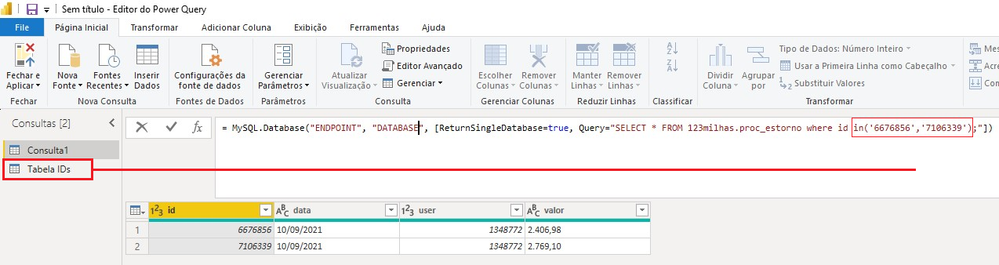
I'm try make a query, find by ID, this ID are in another table in power query, like this example bellow:

SELECT * FROM 123milhas.proc_estorno where id in( TABELA IDs.ID );

Can i do this ?


Query by another table.png

1 ACCEPTED SOLUTION
v-kelly-msft
Community Support
Community Support

Hi  @Adam_Silva ,


In query editor, click new Source>blank query:

vkellymsft_0-1631785098025.png


Then using below M codes:

= Table.SelectRows(#"Table",each List.Contains({6676856,7160339},[ID]))

And you will see:

vkellymsft_1-1631785140148.png

For the related .pbix file,pls see attached.


Best Regards,
Kelly

Did I answer your question? Mark my raeply as a solution!

View solution in original post

3 REPLIES 3
v-kelly-msft
Community Support
Community Support

Hi  @Adam_Silva ,


In query editor, click new Source>blank query:

vkellymsft_0-1631785098025.png


Then using below M codes:

= Table.SelectRows(#"Table",each List.Contains({6676856,7160339},[ID]))

And you will see:

vkellymsft_1-1631785140148.png

For the related .pbix file,pls see attached.


Best Regards,
Kelly

Did I answer your question? Mark my raeply as a solution!

Anonymous
Not applicable

Even easier than custom SQL is to just use the library function, and instead of IN, use List.Contains:


= Table.SelectRows(Table, each List.Contains(List.Buffer(#"Tabelas IDs"[ID]), [FactTableIDColumnName]))


That should fold, too.


--Nate 

Anonymous
Not applicable

Yes. The easiest way is to make your "in" values into a list, then refer to the list. You should make the ID column type text, and then:


Add a new query named "items". 


= Text.Combine(List.Buffer(#"Tabela IDs"[ID]), ",")


Now you have a comma separated list named items.


Your IN statement would now be:


IN ("&items&")


As in, end your quote right where you need the list items inserted, &items&, and then start quotes again. 

--Nate


Helpful resources

Announcements
Power BI DataViz World Championships

Power BI Dataviz World Championships

The Power BI Data Visualization World Championships is back! Get ahead of the game and start preparing now!

December 2025 Power BI Update Carousel

Power BI Monthly Update - December 2025

Check out the December 2025 Power BI Holiday Recap!

FabCon Atlanta 2026 carousel

FabCon Atlanta 2026

Join us at FabCon Atlanta, March 16-20, for the ultimate Fabric, Power BI, AI and SQL community-led event. Save $200 with code FABCOMM.