cancel
Showing results for 
Search instead for 
Did you mean: 

Get Fabric Certified for FREE during AI Skills Fest. This week only. Secure your voucher now.

Reply
Adam_Silva
New Member

Query SQL based on another table in power query.

Hello,


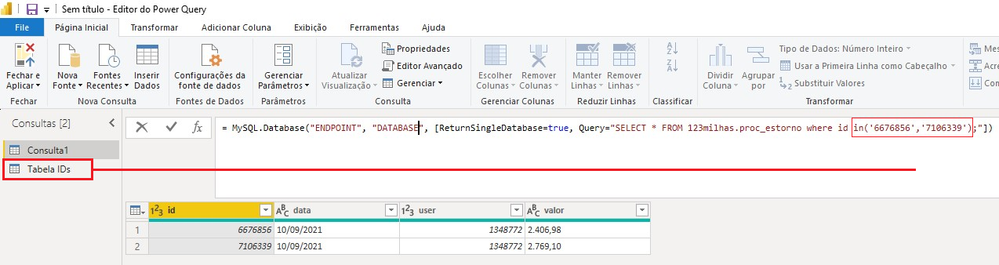
I'm try make a query, find by ID, this ID are in another table in power query, like this example bellow:

SELECT * FROM 123milhas.proc_estorno where id in( TABELA IDs.ID );

Can i do this ?


Query by another table.png

1 ACCEPTED SOLUTION
v-kelly-msft
Community Support
Community Support

Hi  @Adam_Silva ,


In query editor, click new Source>blank query:

vkellymsft_0-1631785098025.png


Then using below M codes:

= Table.SelectRows(#"Table",each List.Contains({6676856,7160339},[ID]))

And you will see:

vkellymsft_1-1631785140148.png

For the related .pbix file,pls see attached.


Best Regards,
Kelly

Did I answer your question? Mark my raeply as a solution!

View solution in original post

3 REPLIES 3
v-kelly-msft
Community Support
Community Support

Hi  @Adam_Silva ,


In query editor, click new Source>blank query:

vkellymsft_0-1631785098025.png


Then using below M codes:

= Table.SelectRows(#"Table",each List.Contains({6676856,7160339},[ID]))

And you will see:

vkellymsft_1-1631785140148.png

For the related .pbix file,pls see attached.


Best Regards,
Kelly

Did I answer your question? Mark my raeply as a solution!

Anonymous
Not applicable

Even easier than custom SQL is to just use the library function, and instead of IN, use List.Contains:


= Table.SelectRows(Table, each List.Contains(List.Buffer(#"Tabelas IDs"[ID]), [FactTableIDColumnName]))


That should fold, too.


--Nate 

Anonymous
Not applicable

Yes. The easiest way is to make your "in" values into a list, then refer to the list. You should make the ID column type text, and then:


Add a new query named "items". 


= Text.Combine(List.Buffer(#"Tabela IDs"[ID]), ",")


Now you have a comma separated list named items.


Your IN statement would now be:


IN ("&items&")


As in, end your quote right where you need the list items inserted, &items&, and then start quotes again. 

--Nate


Helpful resources

Announcements
May Power BI Update Carousel

Power BI Monthly Update - May 2026

Check out the May 2026 Power BI update to learn about new features.

Fabric SQL PBI Data Days

Data Days 2026 coming soon!

Sign up to receive a private message when registration opens and key events begin.

Power BI DataViz World Championships carousel

Power BI DataViz World Championships - June 2026

A new Power BI DataViz World Championship is coming this June! Don't miss out on submitting your entry.